
How to Turn Expertise Into Business Systems
17 February 2026
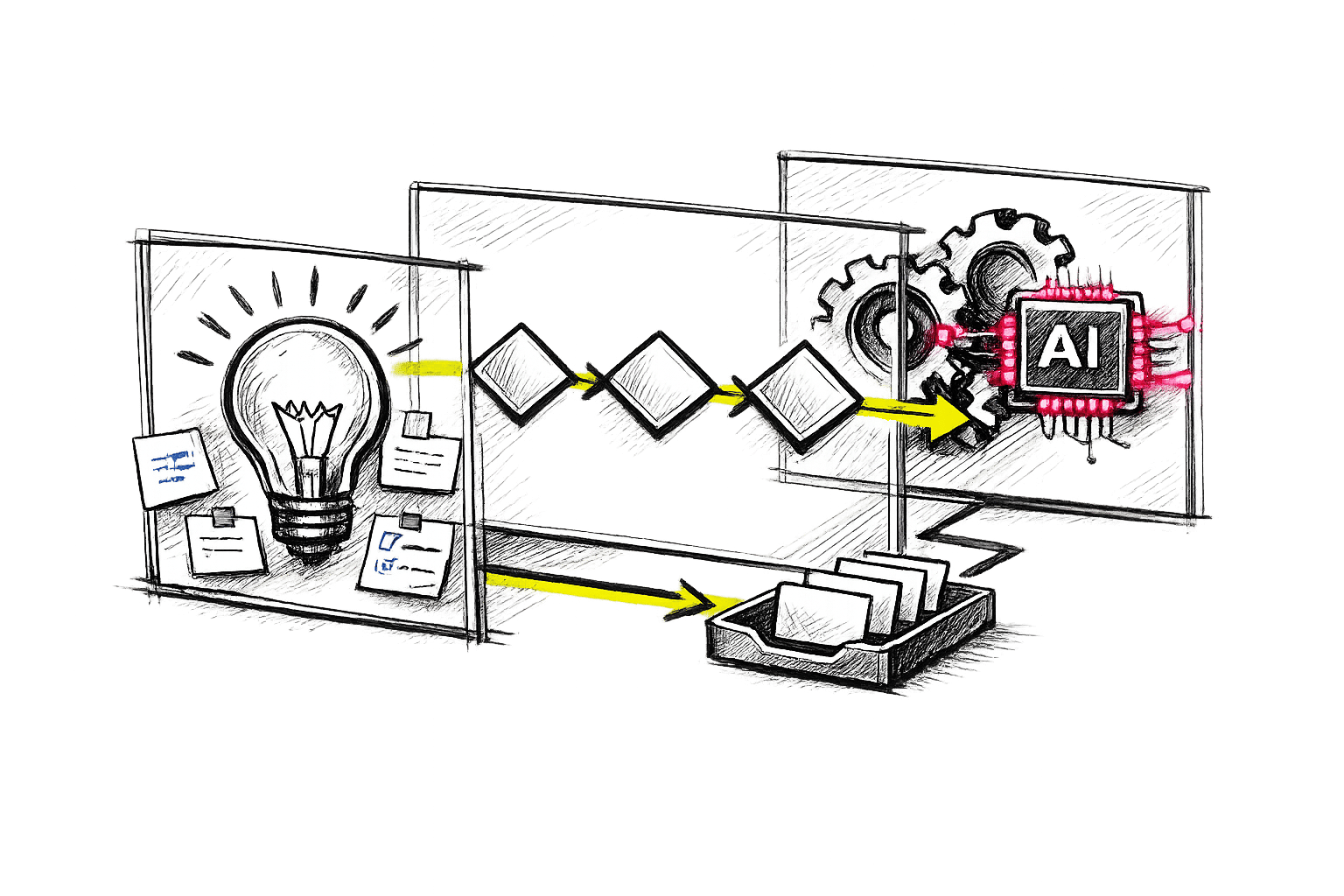
When your business relies on a few key individuals to "just know" how things work, growth becomes difficult. As companies scale, this dependency leads to bottlenecks, costly errors, and burnout. The solution? Documenting expertise into systems that anyone can follow.
Key Benefits of Systemised Expertise:
- Businesses with systems are valued 71% higher than those reliant on individuals.
- Documented processes reduce onboarding time by up to 50%.
- Teams spend less time searching for information, cutting inefficiencies by 20–30%.
Steps to Create Business Systems:
- Identify Critical Knowledge: Use the "hit by a bus" test to pinpoint tasks that would stop without key people.
- Document Processes: Use checklists, flowcharts, or video tutorials to create clear, standardised guides.
- Build Decision Frameworks: Simplify recurring decisions with if/then rules and task delegation.
- Leverage AI: Automate repetitive tasks and enhance knowledge accessibility with AI-powered tools.
- Integrate Systems into Daily Work: Test systems, involve your team, and track their effectiveness with clear metrics.
Why It Matters: Businesses with well-documented systems grow faster, reduce errors, and free up owners to focus on strategy instead of daily operations.
Start small by systemising one key process, test it, and refine it over time. This approach transforms your business into a scalable, resilient operation.
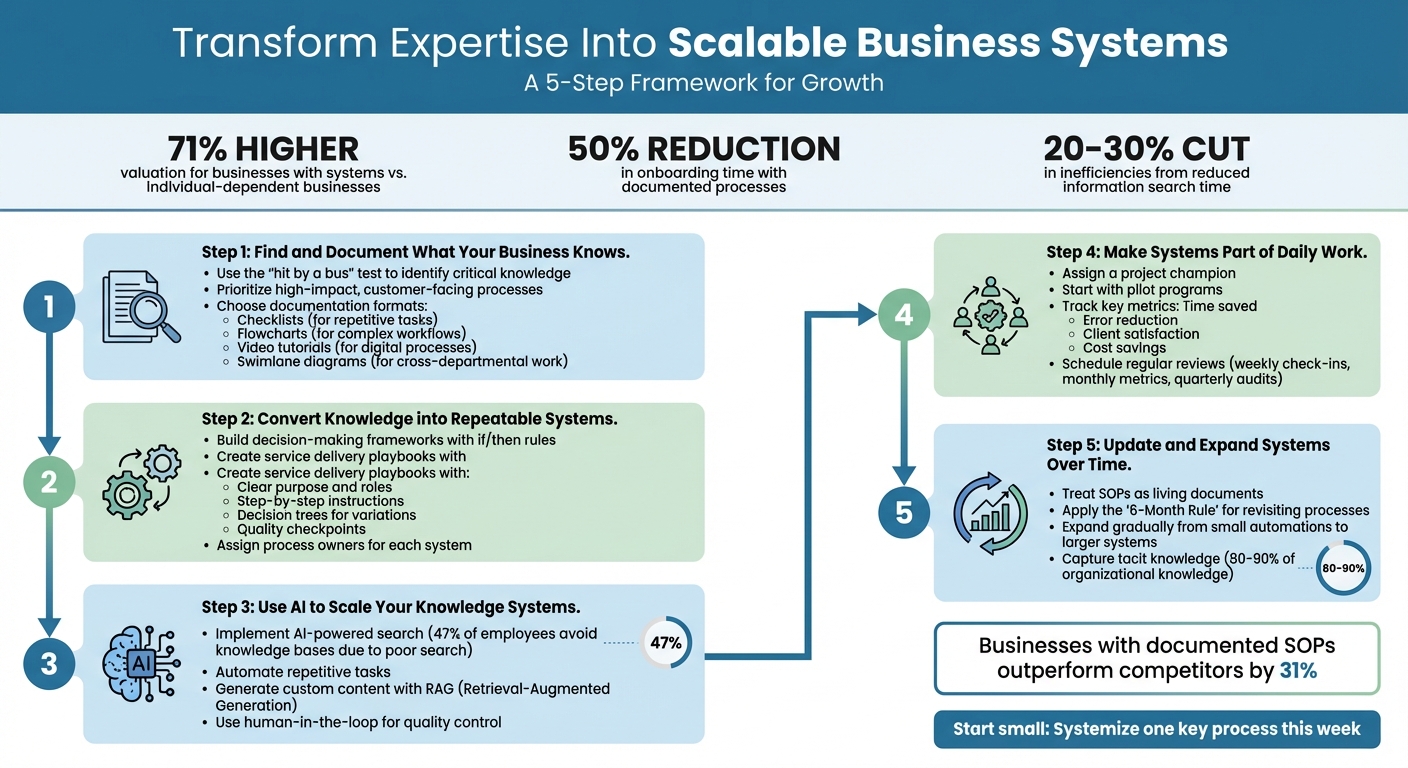
5-Step Process to Transform Expertise Into Scalable Business Systems
Ultimate Guide to Systemize Your Business (+ AI System)
sbb-itb-9e8c2f9
Step 1: Find and Document What Your Business Knows
The first hurdle in creating documentation isn’t about writing – it’s figuring out what needs to be documented in the first place. Businesses often have a wealth of knowledge scattered across emails, informal processes, and the heads of team members. The trick is pinpointing the knowledge that truly matters and prioritising it before committing to the task of capturing it. Once identified, focus on the insights that are crucial for smooth operations.
How to Identify Critical Knowledge Areas
Start with the "hit by a bus" test: what tasks would come to a standstill if a key team member were suddenly unavailable? These vulnerabilities – like outdated finance systems or customised CRM workflows – should be addressed first. A great example comes from David Finkel, who, between 1997 and 2005, transitioned from coaching 30 clients per quarter to a system that served over 2,000 clients annually. He did this by converting his personal expertise into structured systems, such as diagnostic tools and accountability frameworks. The result? Not only was his workload reduced, but client satisfaction also improved.
Next, prioritise processes that have the most impact on customers, carry compliance risks, or require frequent rework. Having well-organised, easily searchable knowledge can cut the time employees spend looking for information by up to 35%. To avoid missing anything important, map your operations into key areas like lead generation, HR, finance, and client fulfilment. Use a "hierarchy of expertise" to identify tasks handled by top experts or key employees that could be delegated to lower-cost roles or automated.
Best Ways to Record Expertise
The format of your documentation plays a big role in its effectiveness. Here are some options:
- Checklists: Perfect for repetitive tasks, ensuring no steps are skipped.
- Flowcharts: Great for visualising complex workflows and decision points.
- Video tutorials: Ideal for digital processes that are tricky to describe in writing, especially for visual learners.
- Swimlane diagrams: Useful for illustrating cross-departmental processes by clearly assigning ownership for each step.
Whatever format you choose, aim for consistency across your organisation. Standardised templates make it easier to read, search, and update documentation quickly. To test its effectiveness, have someone unfamiliar with the task follow the documentation – if they struggle, it’s a sign you need to add more detail. Assign a "content owner" to each document and schedule regular reviews (e.g., quarterly) to ensure it stays up-to-date as tools and policies change.
"You can’t improve what isn’t written down." – Yuval Karmi, Founder and CEO of Glitter AI
But documentation isn’t just about processes – it’s also about capturing the subtle, unwritten knowledge people rely on.
Extracting Knowledge That Isn’t Written Down
Some of the most valuable insights are the ones people don’t even realise they’re using – things like instinct, pattern recognition, and judgement. To capture this tacit knowledge, you’ll need structured conversations, not just observation. Short, focused interviews (30–45 minutes) can work well, as they respect the expert’s time while providing plenty of material for documentation.
During these sessions, use "think-aloud" prompts to encourage experts to explain why they make certain decisions as they go through a task. This approach helps uncover hidden decision points and practical rules of thumb. Ask specific questions like, "What signals tell you something is wrong before it becomes obvious?" or "How do you handle things when the standard process doesn’t work?" These questions can help surface the nuanced insights that often go unspoken. Alternatively, you can use passive tools that record screen activity and voice in real-time to capture workflows as they naturally happen.
"Knowledge preservation isn’t just about documentation – it’s about designing systems that capture how work actually happens, so it can be reused, refined, and shared." – Fluency
To avoid feeling overwhelmed, start small – focus on capturing and refining one key workflow each week. Poor documentation and inefficient processes can cost companies 20–30% of their annual revenue. Even small improvements can lead to noticeable benefits.
Step 2: Convert Knowledge into Repeatable Systems
Once you’ve documented your business knowledge, the next step is to transform it into systems that can be consistently applied by anyone on the team. This doesn’t mean creating inflexible rules that stifle creativity. Instead, it’s about building frameworks that allow your team to focus on more strategic tasks while maintaining consistent quality. The idea is to transfer expertise so that tasks requiring specialist knowledge can either be automated or handled by less experienced staff.
Building Decision-Making Frameworks
Decision-making frameworks help your team handle recurring situations without needing constant input from senior staff. To create one, start by mapping out the "decision loop" – the process from gathering data to making decisions and taking action. Identify the decision trigger, the data required, and the person responsible for the final decision.
A useful strategy is to categorise decisions by the level of expertise needed. For instance, in a law firm, routine tasks like standard engagement letters could be automated, scheduling and data entry handled by unskilled staff, research conducted by paralegals, document drafting assigned to associate attorneys, and only the most complex strategies tackled by senior partners. The goal is to delegate as much as possible to lower expertise levels, leaving senior staff to focus on critical decisions.
Use if/then rules to address variations in tasks, eliminating guesswork and ensuring consistency. For high-risk decisions, implement checkpoints where the system provides analysis, but the final judgement rests with an expert.
"Technology that can improve the speed, quality and execution of decision making will reliably increase the performance of more or less any organisation." – John Gibson, Chief Commercial Officer, Faculty
These frameworks set the stage for structured service delivery and make it easier to develop comprehensive playbooks.
Creating Service Delivery Playbooks
Building on decision frameworks, service delivery playbooks standardise processes across your organisation. These are dynamic guides that adapt as your business evolves. A solid playbook should include:
- A clear purpose
- Defined roles and responsibilities
- Step-by-step instructions
- Decision trees for handling variations
- Troubleshooting guides for common issues
To make playbooks easier to use, incorporate visual elements. For example, swim lane diagrams can show which team member is responsible for each step, while decision diamonds highlight points where choices need to be made. A client onboarding playbook might include a swim lane chart to map out key handoffs between departments.
Add quality checkpoints to ensure consistency. For instance, proposals and deliverables should meet predefined standards for pricing, branding, and legal compliance. These checkpoints help catch errors early without requiring constant supervision.
Keeping Systems Usable and Current
Even the most well-designed system won’t work if it’s outdated or ignored. Focus on systemising workflows that have a big impact but don’t require excessive effort, such as client onboarding or invoice generation. Start with a pilot group to test and refine the system before rolling it out across the organisation.
Assign a process owner to each system – someone responsible for keeping it updated and ensuring it remains effective. Schedule quarterly reviews to remove outdated information and adjust processes as tools or policies change. As AI capabilities improve, automation will become even more accessible.
Store all systems in a centralised, searchable platform like Notion or Confluence, rather than scattering them across folders or Google Docs. This ensures everyone has access to the latest version, making it easier for the team to follow and trust the system.
Step 3: Using AI to Scale Your Knowledge Systems
AI can supercharge how your organisation uses its knowledge systems. The real challenge lies in making documented information instantly accessible. By integrating AI into your processes, you can speed up decision-making and ensure smoother operations. Instead of static playbooks that gather dust, AI transforms them into dynamic tools – saving time, minimising errors, and allowing your team to focus on tasks that need human insight.
AI Tools for Finding Information Quickly
Traditional search systems often rely on exact keyword matches, which can leave employees wasting time digging through folders or asking colleagues for answers that already exist. In fact, 47% of employees avoid using their company’s knowledge base because of poor search functionality. AI-powered search, on the other hand, uses Natural Language Processing (NLP) to understand the intent behind a query, delivering relevant results even when the wording is different.
Take Intuit QuickBooks, for example. In 2025, they integrated an AI-powered knowledge base into Slack for their support teams. Agents could ask questions conversationally and get immediate answers from internal documentation. This innovation cut case resolution times by 36%, saving around 9,000 hours annually and boosting their Net Promoter Score. The system’s success lies in its use of Retrieval-Augmented Generation (RAG), which pulls specific, verified information from company documents rather than generating generic responses.
Smaller businesses can benefit too, even with simpler setups. TerraHR, a 14-person HR consulting firm, built a self-updating knowledge base in January 2024 using Flowise. This system automatically retrieves information from sources like the U.S. Department of Labor and CalHR portals. By automating access to compliance data, they reduced onboarding time for consultants from 13.2 hours to just 3.9 hours. They focused on a single high-demand area – compliance – and made it searchable in plain English.
Beyond finding information, AI also shines when it comes to automating repetitive tasks.
Automating Repetitive Work
AI thrives on routine. It handles predictable tasks so your team can focus on more strategic work. For instance, Remote, a company with over 1,800 employees, used tools like Zapier and ChatGPT in 2025 to create a system for triaging IT support requests. This system retrieves past ticket data, auto-generates responses, and now manages 28% of all tickets – saving their three-person IT team over 600 hours every month.
Automation works best in "knowledge hotspots", where the same questions or issues crop up repeatedly. ActiveCampaign tackled a 25% churn rate among users who lacked personalised onboarding by using AI to tag signups by language and enrol them in tailored webinar sessions. This resulted in a 440% increase in webinar attendance and a 15% drop in early churn.
Start with tasks that have clear inputs and outputs. For example, Popl used OpenAI and Zapier to manage hundreds of daily HubSpot form submissions. The AI filters spam, identifies genuine leads, and enriches them with company data, saving the business approximately £15,000 annually. A technique called "progressive delegation" works well here – start with small, manageable tasks for AI and gradually expand its role as the system proves its reliability.
But AI’s capabilities don’t stop at automation. It also changes how businesses create tailored content.
Using AI to Generate Custom Content
AI can produce reports, training materials, and client documents based on your existing systems. This is where Retrieval-Augmented Generation (RAG) comes into play again. By pulling specific chunks of your internal data – like PDFs, tickets, or manuals – AI can craft responses that reflect your organisation’s unique expertise.
Tapestry, a luxury fashion retailer, implemented an AI knowledge assistant using AWS Bedrock and Claude 3. This system supports 300 employees across six teams, streamlining onboarding and role transitions through a single interface. The AI doesn’t just locate documents – it synthesises information to provide precise, tailored answers.
To maintain high standards, many organisations use a "human-in-the-loop" approach. Here, AI drafts content, but a subject matter expert reviews and refines it before it’s finalised. Tools like Fluency can even capture screen actions to automatically create structured Standard Operating Procedures (SOPs) with screenshots, cutting out the need for manual writing. Similarly, platforms like Ravenna monitor platforms like Slack or Teams to identify common questions and answers, then draft knowledge base articles based on these real-time interactions.
"Self-updating systems don’t eliminate human judgment – they restore its value by removing the friction of finding reliable facts." – Dr. Arjun Mehta, Organisational Technologist
The Knowledge Base Software Market is expected to grow from roughly £1.52 billion in 2025 to nearly £5.76 billion by 2034. This growth reflects how businesses are recognising the power of effective knowledge management to boost productivity by up to 25%. With AI, documented expertise becomes an active tool, driving efficiency across your organisation.
Step 4: Making Systems Part of Daily Work
Creating systems is just the beginning – what really matters is weaving them into your daily operations. A well-crafted playbook sitting idle on a shared drive won’t bring results. The goal is to make these systems second nature, track their effectiveness, and adapt them as your business evolves.
Getting Teams to Use New Systems
One of the biggest hurdles is getting buy-in from your team. Resistance often stems from how systems are introduced. Instead of imposing changes from the top down, assign a project champion who can rally the team and encourage participation. This approach helps the system feel like a shared resource, not just another directive from management. Start small by piloting the system in one department to work out any kinks.
A gradual approach, like progressive delegation, can help build momentum. For instance, start with small automations that deliver noticeable results. During the design phase, try the Sticky Note Method: map out the process with physical or digital sticky notes and let team members rearrange, add, or remove steps. This hands-on involvement makes them co-creators, not passive users. Tools like Loom can also help by capturing workflows in action for easy reference.
"Adoption doesn’t happen on its own – just because you built the automation doesn’t mean it’ll get used. Someone has to be responsible for enablement." – Rachel Woods, Founder, The AI Exchange
To encourage adoption, make system contributions part of performance reviews. Create open channels for feedback – like office hours or dedicated Slack threads – so team members can share ideas or flag issues. Often, those doing the work are the first to spot inefficiencies. Keep rollout meetings brief and focused to reduce pushback, and once the system is in use, measure its impact to guide improvements.
Tracking Whether Systems Work
If you can’t measure it, you can’t improve it. Before rolling out a system, set baseline metrics to track its impact. For example, you might aim to cut onboarding time from eight hours to two or slash invoicing errors by 90%. Data shows that businesses with well-documented Standard Operating Procedures (SOPs) outperform competitors by 31%, and structured processes can reduce new hire ramp-up time by half.
Track metrics like time saved, error reduction, client satisfaction, and cost savings. Look for signs of success, such as fewer "how-to" questions in Slack or reduced updates to internal documentation. Test the system on a small scale – 2–3 instances over a few weeks – before rolling it out company-wide. Establish a routine for reviews, such as weekly team check-ins, monthly metric evaluations, and quarterly audits. Assign a system owner to oversee usage and accuracy, and use shadowing (where an expert observes someone using the system) to validate its effectiveness.
Regular reviews and updates ensure your systems stay relevant and effective.
Updating and Expanding Systems Over Time
SOPs can quickly become outdated if left untouched. Instead of treating them as static documents, think of them as living resources that grow and adapt with your business. Knowledge management should be a continuous cycle of creating, sharing, and refining.
Encourage team members to update SOPs in real time when they discover better methods or encounter new situations. AI tools can help by managing large volumes of information and flagging outdated content. For example, applying a "6-Month Rule" to revisit previously unsuccessful processes ensures your systems keep up with evolving technology.
As you gain confidence, expand your systems gradually. Start by automating smaller tasks, then scale up once you’re sure the process is reliable. Keep in mind that 80–90% of an organisation’s knowledge is tacit – rooted in employees’ intuition and experience. By capturing and refining this expertise, you turn it into a resource that reduces dependence on individuals and supports long-term growth.
Conclusion: Building a Business That Runs on Systems, Not People
Shifting your business from being dependent on individuals to operating through systems creates a scalable, sustainable asset. When expertise is embedded in frameworks rather than limited to individuals, your business becomes resilient, easier to manage, and primed for growth without relying on your constant involvement. This approach lays the groundwork for achieving the operational advantages outlined below.
Main Benefits of Systemised Expertise
Businesses that rely on systems rather than owners are valued 71% higher than those tied to an individual’s involvement. That’s a game-changer, not a minor improvement. Buyers see the value in businesses with repeatable processes because they reduce dependency on personal relationships or specific employees. Beyond boosting valuation, systemised operations eliminate bottlenecks caused by the owner, allowing for growth beyond personal capacity.
Operationally, the numbers speak for themselves. Companies with well-defined Standard Operating Procedures (SOPs) outperform their competitors by 31%, and thorough documentation can cut the time it takes to onboard new hires in half. Systems also safeguard against the disruption caused by losing key employees, ensuring that institutional knowledge stays within the organisation. Perhaps most importantly, systems free business owners from being stuck in daily operations. Currently, small business owners spend 68% of their time working in the business instead of on it, with 48% reporting monthly burnout. Systems provide relief, granting time and mental space to focus on growth and strategy.
"Business value increases as owner involvement in operations decreases." – Scott Fritz, Author of The 40 Hour Work Year
Your First Steps
To get started, focus on one process that has a significant impact. Begin by mapping out your critical client flow – the path from initial contact to final delivery. This is the core of your business, and systemising it will yield immediate results. Identify a major bottleneck and tackle it first.
Next, designate a Systems Champion – a team member who excels at thinking in terms of processes and can lead the documentation effort. Avoid documenting your own processes, as you might unintentionally skip steps. Instead, use the Sticky Note Method to visually map workflows before formalising them. Test the system with someone unfamiliar with the task to uncover gaps or unclear instructions.
Finally, automate repetitive tasks. Look for rule-based activities like sending invoice reminders or onboarding emails and use AI tools or software to handle them. Establish a central knowledge hub – using platforms like Notion or Confluence – where SOPs are searchable, version-controlled, and accessible to the team. Assign a system owner to maintain accuracy and ensure regular updates every 6–12 months.
The goal isn’t to achieve perfection right away – it’s to make consistent progress. Start with small, manageable steps, build momentum, and watch your business evolve into an operation that works for you, not the other way around.
FAQs
Which process should I systemise first?
To build a more efficient and scalable business, begin by organising and documenting your key processes. Focus on capturing essential workflows – like day-to-day operations or areas that require specialised knowledge.
By doing this, you create a clear roadmap that ensures consistency, makes delegation easier, and reduces the risk of bottlenecks. Plus, it helps your business function smoothly without over-relying on specific individuals.
How do I capture tacit knowledge quickly?
To gather tacit knowledge effectively, consider AI-driven techniques such as guided interviews. These tools facilitate focused discussions with experts, helping to uncover valuable insights that might otherwise remain hidden. AI can also organise and structure this information into a usable format.
Another straightforward option is a 30-minute brain dump. In this process, individuals share their thoughts freely, and AI tools transform these into practical, actionable insights. These methods are particularly useful for retaining essential expertise during times of change, such as employee turnover or transitions.
How can I use AI without risking wrong answers?
To get the most out of AI while keeping errors to a minimum, it’s crucial to document your expertise in clear systems and frameworks. This approach helps ensure that AI outputs are shaped by your established knowledge base. Incorporate AI into structured workflows, backing these with key performance indicators (KPIs) and feedback loops to check and validate results. Make it a habit to regularly review and fine-tune AI-generated outputs to ensure they meet your standards. By doing so, you can reduce dependence on AI for critical decisions while improving its overall reliability.
Related Blog Posts
Create the Flexibilty You've Always Craved
Reclaim control and build real independence.
We respect your inbox. No spam, just meaningful updates.