10 Ways to Reduce Dependency on Key Employees
19 February 2026

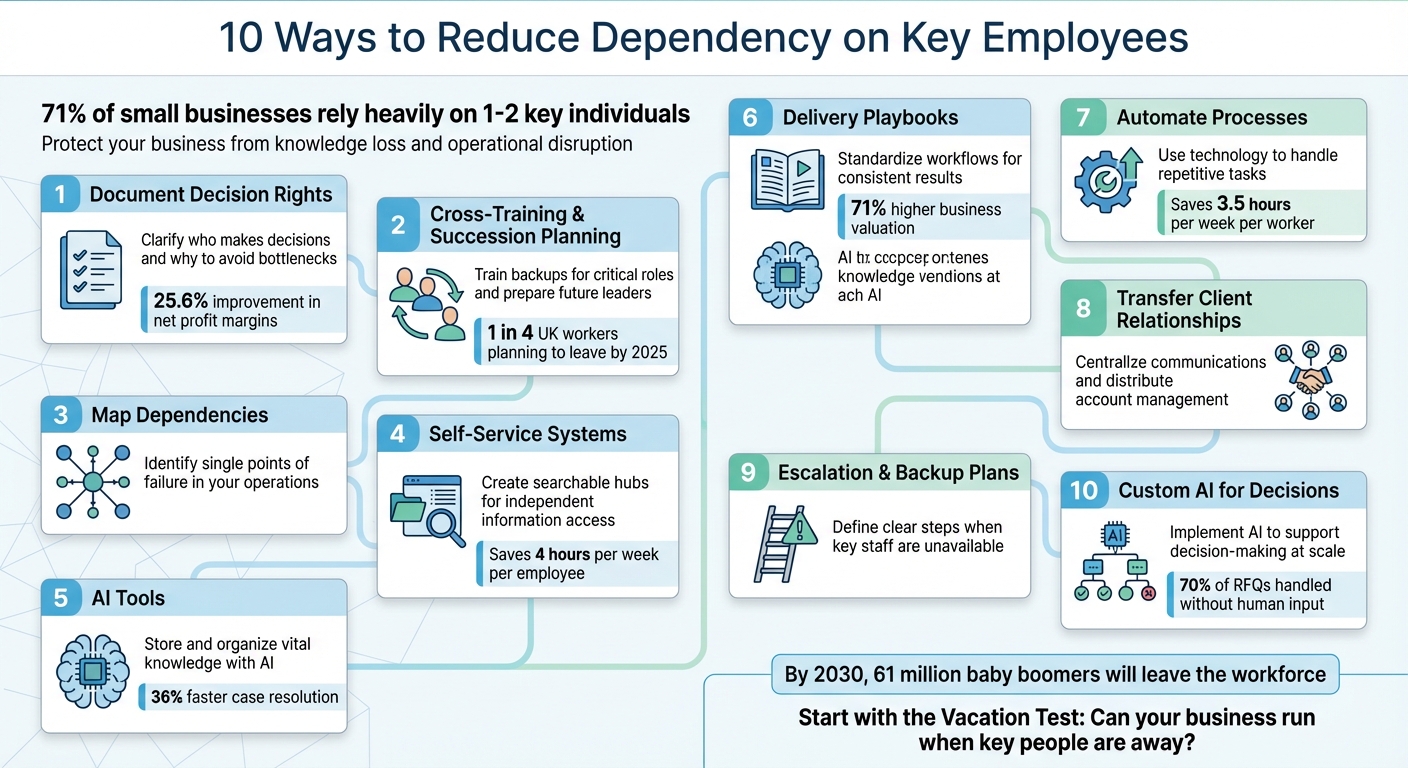
Relying too much on a few key employees puts your business at risk. If they leave or take time off, critical processes can break down, resulting in delays, lost knowledge, and reduced team efficiency. With 71% of small businesses leaning heavily on one or two individuals, this issue is widespread and needs addressing.
Here’s how you can reduce dependency on key employees:
- Document Decision Rights: Clearly outline who makes decisions and why to avoid bottlenecks.
- Cross-Training and Succession Planning: Train backups for every critical role and prepare future leaders.
- Map Dependencies: Identify areas reliant on single individuals and address them.
- Self-Service Systems: Create knowledge hubs for teams to access information independently.
- AI Tools: Use AI to store and organise vital knowledge for easy access.
- Delivery Playbooks: Standardise workflows to ensure consistent results.
- Automate Processes: Use technology to handle repetitive tasks and reduce manual effort.
- Transfer Client Relationships: Centralise communications and ensure multiple team members manage key accounts.
- Escalation and Backup Plans: Define clear steps for handling issues when key staff are unavailable.
- Custom AI for Decisions: Implement AI tools to support decision-making and scale expertise.
10 Strategies to Reduce Key Employee Dependency in Your Business
How To Protect Against Losing A Key Employee [Small Business]
sbb-itb-9e8c2f9
1. Document Decision Rights and Frameworks
When only one person understands the reasoning behind a decision, it can lead to confusion and inefficiency. Documenting decision rights ensures clarity about who has the authority to make specific decisions, the rationale behind them, and who is accountable for the outcomes. Without this, skilled individuals can unintentionally become gatekeepers, creating bottlenecks where every new idea must pass through them.
To address this, focus on capturing the reasoning behind decisions – not just the outcomes. For example, a US media company implemented the OVIS framework (Owner, Veto Holder, Influencer, Supporter), assigning decision ownership to a single person. This approach reduced inefficiencies, saving 15% in technology, 10% in finance, and 5% in marketing activities. By limiting veto power and clarifying roles, the framework avoided delays and confusion.
"Murky decision rights not only waste leaders’ time but also undermine confidence in whatever decision is finally reached." – Boston Consulting Group
For routine scenarios, visual decision trees can simplify processes, while Architecture Decision Records (ADRs) are useful for documenting key trade-offs in technical roles . To test the robustness of your processes, try the "Vacation Test": ensure that critical personnel can fully disconnect without operations faltering. If they can’t, it’s a sign that processes need better documentation.
Companies that empowered employees by revising decision rights saw industry-adjusted net profit margins improve by 25.6 percentage points compared to those sticking to rigid, top-down structures. The goal is to teach team members the reasoning behind decisions so they can make informed choices on their own.
This structured approach to documenting decision-making not only streamlines operations but also sets the stage for effective cross-training and succession planning, which will be discussed next.
2. Implement Cross-Training and Succession Planning
Cross-training helps distribute essential knowledge among team members, while succession planning ensures that potential leaders are ready to fill key roles before a crisis strikes. Both skills and relationships are essential for maintaining smooth operations.
For cross-training to work, it needs to be more than just passive observation. Pair a backup employee with a seasoned expert to work on real tasks together. Gradually, let the backup take the lead under the expert’s supervision, switching roles until the backup can handle the work independently. Rotate responsibilities every quarter to uncover any gaps in documentation. A dependency matrix can be a useful tool here – list critical functions like operations, finance, and sales, assigning both a primary owner and a backup. Any function without a backup is a high-risk area that requires immediate attention. This method turns individual expertise into scalable processes that benefit the entire organisation.
"Critical knowledge loss is not simply what the departing employees know about their job tasks, but also who they know and collaborate with to get work done on time." – MIT Sloan Management Review
For succession planning, use a heat map to pinpoint critical roles and evaluate internal candidates based on their potential and how well they align with the organisation’s values. Mentoring, job shadowing, and short-term assignments are great ways to prepare these candidates for future roles. With one in four UK workers planning to leave their jobs by 2025 and nearly half the workforce expected to be aged 50 or older by 2030, waiting for someone to hand in their notice is a risky strategy. By acting early, businesses can not only ensure operational stability but also set the stage for future growth.
Next, we’ll delve into mapping dependencies for critical processes.
3. Map Dependencies for Critical Processes
After cross-training, the next step is identifying where your operations are still vulnerable. Mapping dependencies helps transform your organisational knowledge into processes that can withstand challenges. With 71% of small businesses relying on just one or two key individuals for their success, ignoring these vulnerabilities could put your operations at serious risk.
Start by visualising dependencies with a simple grid. List your critical functions (like operations, finance, sales, and client delivery) on one axis and your team members on the other. If a function only has one name tied to it and no backup, you’ve identified a high-risk dependency that demands immediate action. This method provides a clear snapshot of your weak points and helps prioritise where to begin.
"Key person dependency risk occurs when your business becomes overly reliant on specific individuals for critical operations… It’s the business equivalent of a single point of failure in an engineering system." – WorkFlawless
You can take this further with visual process mapping. Tools like flowcharts or swimlane diagrams allow you to break down workflows, showing each step, decision point, and handoff. These diagrams make it easy to spot "gatekeeper" risks – situations where one person holds control over approvals or key decisions. When these individuals are unavailable, bottlenecks emerge, halting progress. Tools such as Lucidchart, Miro, or Google Drawings are great options for creating these maps without needing advanced technical skills.
Another practical approach is the "vacation test." Look for processes that falter when a key person is out of the office. These are your most pressing risks, especially if they involve employees nearing retirement or those managing crucial client relationships. Once you’ve mapped these dependencies, store all the information in a centralised, easily searchable location. This ensures everyone on the team can access it, avoiding version control issues and keeping operations running smoothly.
4. Build Self-Service Capabilities Within Teams
After mapping out dependencies, the next step is to create self-service systems that help teams work more independently and reduce the need for constant expert intervention. Research shows the average employee spends four hours per week – equivalent to five full work weeks per year – switching between apps to find information. Additionally, 91% of people say they’d use an online knowledge base if it were accessible and tailored to their needs. Instead of hiring more staff, the focus should shift to developing systems that let your current team operate more efficiently without frequent interruptions.
To make this happen, start by capturing and organising essential knowledge. Conduct structured interviews to gather insights, stories, and best practices. Use AI transcription tools to document these discussions and create the first drafts of playbooks or FAQs. The aim is to consolidate this information into a centralised, searchable hub – a single, reliable source where employees can quickly find what they need. This approach also tackles the issue of 47% of employees avoiding their company’s knowledge base due to disorganised or hard-to-find content.
A great example of this in action comes from Thoughtworks. In 2021, their Software Licensing And More (SLAM) team managed over 10,000 helpdesk tickets, accounting for 25% of the company’s total volume. Product Owner Claire Kaplan discovered that 70% of these requests were for pre-approved software. This insight led to the creation of an automated self-service platform, which delivered services 34% faster, reduced operational time by 75%, and achieved a 98% satisfaction rate.
"A strong collaboration between the licensing team, data scientists, and our automation and customer experience experts has enabled it to go from a completely manual licensing system to automation and self-service." – Sara Michelazzo, Head of Customer Experience for TechOps at Thoughtworks
When building your self-service hub, keep the documentation simple and free of jargon. Research highlights that 88% of employees admit to pretending they understand office jargon that actually confuses them. Use clear, consistent language and make sure there’s an easy way for users to escalate issues to human support if needed. Regularly reviewing and updating the hub ensures it stays relevant, concise, and user-friendly. This is especially important, as 31% of employees prefer resolving complex problems through digital self-service rather than direct human interaction.
5. Use AI-Powered Knowledge Assets with Beyond the Founder
After establishing self-service capabilities, the next hurdle is retaining the invaluable tacit knowledge held by your key employees. With an estimated 61 million baby boomers set to leave the workforce by 2030, businesses face a potential "knowledge exodus". Alarmingly, only 29% of companies have a structured offboarding process to retain this expertise, and 41% rarely or never collect knowledge from retiring employees. This gap can leave organisations exposed when crucial personnel depart. Fortunately, AI-powered tools now offer a proactive way to safeguard this expertise.
AI-powered knowledge assets simplify the process of capturing and organising expertise, eliminating the need for exhaustive manual documentation. Beyond the Founder’s platform provides a no-code solution, allowing experts to input their insights using a drag-and-drop editor. These insights are then structured into reusable blocks like hierarchies, rules, and actions. The system integrates expert knowledge with machine learning and symbolic reasoning, resulting in explainable AI. This means frontline teams not only get recommendations but also understand the reasoning behind them – avoiding the pitfalls of "black-box" AI.
A standout example of this approach is Intuit QuickBooks. In 2024, the company introduced a custom AI knowledge base within Slack for both support teams and customers. This tool enabled users to search across channels, chats, and PDFs for immediate answers. The result? Support cases were resolved 36% faster, boosting the company’s Net Promoter Score (NPS) and improving representative confidence. This success highlights how AI can transform hidden expert knowledge into actionable insights.
"KBOps (Knowledge Base Operations) is a no-code AI solution that enables subject matter experts (SMEs) to capture, manage, and operationalise their knowledge at scale, without needing data science or coding expertise." – BeyondAI
To get started, focus on capturing tacit knowledge in critical areas, such as legacy finance systems or custom software processes. Use AI-enabled techniques like structured interviews and screen recording to document not just the "what" but also the "why" behind decisions. Beyond the Founder’s platform also includes a closed-loop feedback system, allowing frontline workers to flag inaccuracies or suggest updates. This ensures the knowledge base stays accurate and relevant. By turning scattered expertise into a searchable and scalable resource, organisations can maintain continuity and reduce reliance on constant technical support.
6. Create Delivery Playbooks and Client Journey Maps
Once you’ve gathered expert knowledge using AI tools, the next step is to integrate it into your customer-facing processes. Without clear delivery playbooks and client journey maps, your business risks falling into the trap of knowledge silos – where critical processes are known only to a handful of employees. This can lead to bottlenecks, inconsistent service quality, and operational hiccups.
A delivery playbook is essentially a step-by-step guide. It covers the goals, roles, inputs, specific actions, and expected outcomes for each stage of your service delivery. On the other hand, client journey maps provide a visual representation of every interaction a client has with your business – from their first contact to the final delivery. By focusing on the purpose behind each task, you ensure that your service remains consistent, even if key personnel are unavailable. Interestingly, businesses that can operate without being dependent on their owner or a few key individuals tend to be valued 71% higher than those that aren’t.
A modular approach to playbooks can make a world of difference. Breaking workflows into reusable components – like kickoff calls, technical setups, or admin training – ensures that any trained team member can deliver the same level of quality. This approach can offer a return on investment of over 90% within three years.
"The playbooks that survive scaling get built like Lego sets, not monuments. Each process should be modular, allowing teams to rearrange, duplicate, or retire steps as needed." – Tom Rockwell, CEO, Concrete Tools Direct
To begin, focus on one core product or service and map out its Critical Client Flow. Assign a "systems champion" to document the process objectively, reducing reliance on any single employee. Tools like screen recordings or structured interviews can help capture knowledge that isn’t written down. Additionally, include exception management rules so your team knows how to handle unexpected situations without always needing senior staff. Using resources like Beyond the Founder’s delivery assets – such as client journey maps and facilitation guides – makes it easier to create repeatable and scalable interactions.
7. Automate Routine Processes with Technology
After documenting your workflows, the next step is to shift that collective team knowledge into digital systems. This is where the distinction between task automation and process automation becomes crucial. Task automation handles individual actions – like firing off an email or setting a reminder. Process automation, however, connects these tasks into seamless workflows. For example, it can scan CVs, extract relevant skills, and automatically match candidates to roles – all without manual intervention. By linking tasks into comprehensive systems, you reduce reliance on individuals and embed efficiency directly into your operations.
The benefits are hard to ignore. On average, automation saves workers 3.5 hours every week. For instance, using an automated IT ticketing system within Slack can speed up ticket resolution by 34%. Even more striking, integrating automated notifications for error monitoring has been shown to cut the mean time to resolution by an impressive 88.5%.
"The real value comes when you automate entire processes – scaling what your team does best and unlocking ‘infinite time’ for the work only humans can do." – Rachel Woods, Founder, DiviUp
To get started, focus on high-volume, repetitive tasks that rarely change. Areas like sales (e.g., lead scoring, automated CRM updates), operations (e.g., invoice processing, production scheduling), and HR (e.g., onboarding new employees, account setup) are ripe for automation. A helpful framework for this is the CRAFT Cycle:
- Clear Picture: Document the workflow.
- Realistic Design: Define a minimum viable product (MVP).
- AI-ify: Build the automation.
- Feedback: Test and refine.
- Team Rollout: Implement and train your team.
Start small, automating manageable segments to standardise manual decision-making. One useful approach is the "vacation test": pinpoint what goes wrong when a key employee is on leave. These problem areas are prime candidates for automation.
For tools, platforms like Zapier (starting at £24/month), n8n (from £19/month), or Relay.app (from £21/month) offer no-code solutions. These allow non-technical team members to create workflows through straightforward interfaces. Remember, the aim isn’t to create flawless automation. Instead, focus on building "deliberately simple" systems that handle about 80% of scenarios effectively while gracefully managing the remaining 20%.
8. Transfer Customer Relationships to Account Leads
When one person manages all client relationships, it can leave your business vulnerable. Employee turnover is inevitable, so the goal isn’t to stop it but to ensure that customer relationships are tied to your company – not just to individuals. Alongside automating processes and managing knowledge effectively, securing client relationships is key to reducing reliance on specific team members.
Centralise communications. Move clients away from personal communication channels like individual emails or private messaging apps. Instead, direct all client interactions through company-managed platforms such as a centralised ticketing system or a shared email address (e.g., [email protected]). This creates a searchable record of all communications, accessible to the entire team. It ensures that important client details don’t leave with an employee and strengthens your operational resilience.
Plan a smooth handover. Transferring customer relationships is easier with a structured approach. Start with a shadowing process: the new account lead observes client interactions first, then gradually takes over under the outgoing lead’s guidance [59,60]. This "watch-learn-do" method helps capture subtle, undocumented knowledge – like a client’s preferred tone, recurring challenges, or negotiation preferences – that might otherwise be lost.
Map out stakeholders. Create a detailed list of key client contacts, their roles, and why they’re important to your business. To add depth, ask the outgoing lead to record short video summaries of each client’s CRM profile, explaining account history, preferences, and any unique insights. These recordings preserve nuances that written notes might miss.
"When highly skilled employees leave your organization, they take with them years of hard-earned, experienced-based knowledge – most of it undocumented and irreplaceable." – Dorothy A. Leonard
Test your system. Use the "vacation test" to identify gaps in your process. Have your key account lead completely disconnect during their time off. If clients still reach out to them or service quality declines, it’s a sign that your transfer process needs improvement. Regular role rotation and periodic vacation tests can help ensure your backup systems are ready when needed.
9. Set Clear Escalation Rules and Backup Plans
Even with detailed processes and cross-trained teams, challenges can arise when key personnel are unavailable. Escalation rules outline who to contact when a primary team member is absent or when issues surpass normal thresholds. Without these guidelines, teams risk delays or costly mistakes. These steps ensure operations continue smoothly, even when key staff are unavailable.
Start by creating a dependency matrix. List all critical functions – such as payroll, client onboarding, or system maintenance – alongside the team members responsible for each. Any function with a single owner represents a potential weak link. For each task, document a clear escalation path: identify the primary backup, list secondary contacts, and specify where to find essential system access details. For example, in technical roles, losing a key developer without a backup plan could lead to consultant fees exceeding £120,000 and up to 40% customer churn due to service disruptions.
Beyond identifying dependencies, practical backup measures are essential. Implement the "2-Person Rule", which involves having backups actively collaborate with key employees. Rotate responsibilities regularly to ensure backups are familiar with the tasks and to uncover any gaps in documentation. This approach keeps skills sharp and prepares the team for unexpected situations.
Another effective method is the "vacation test." Require key employees to fully disconnect during their time off – no emails, no calls. If they are contacted during their leave or if service quality drops, it’s a sign that your escalation rules need improvement. Antonio Angelino, Tech Lead Coach, highlights the importance of this approach:
"The goal isn’t to prevent people from leaving… The goal is to build teams where departures strengthen rather than weaken the organisation through forced knowledge distribution and system improvement."
10. Deploy Custom AI Tools for Decision Support
Custom AI tools can bring expert-level decision-making directly into your operations. These tools are capable of managing entire workflows – whether it’s analysing RFQs or generating proposals – handling about 70% of RFQs without requiring human input.
Take, for instance, agentic engineer Reuven Cohen, who produced approximately 7 million lines of code in just 12 months (ending late 2024). That’s equivalent to 9,277 person-months of work – an output that’s 1,020 times what a standard engineer might achieve. This extraordinary productivity highlights how a structured approach can amplify expert decision-making at scale.
A useful framework to adopt is the CRAFT Cycle:
- Define your process
- Design a minimum viable solution
- Build it with AI tools
- Gather feedback through testing
- Roll it out with proper training
Start small by automating low-risk, straightforward tasks – those "tiny but useful" areas. Over time, you can gradually entrust the AI with more complex decisions. For critical areas, such as legal reviews or financial approvals, consider running the AI in "shadow mode." This means the AI suggests decisions, but experts validate them before they are implemented.
To ensure AI decisions are grounded in reliable data, combine trained models with Retrieval-Augmented Generation (RAG). Additionally, document the decision-making processes of your key employees – their decision points, quality standards, and intuitive judgments. These insights can then be converted into structured playbooks for the AI to follow.
"The real value comes when you automate entire processes – scaling what your team does best and unlocking ‘infinite time’ for the work only humans can do."
- Rachel Woods, Founder of The AI Exchange
Tools like Beyond the Founder’s AI-powered assets can help you systematically capture and scale your team’s expertise. The key is to "own the playbook, rent the tech" – document your business logic in a way that’s independent of specific AI tools. This approach ensures you can adapt to evolving technologies without losing your core decision-making frameworks.
Conclusion
Reducing reliance on key individuals starts with capturing their expertise and embedding it into systems that keep your business running smoothly, no matter who’s present. The ten strategies discussed – ranging from documenting decision-making processes to cross-training and leveraging AI tools – can turn your business into a resilient operation, no longer dependent on a handful of people.
The risks of losing critical knowledge are higher than ever, especially with workforce trends shifting. By 2030, nearly half of the UK workforce will be aged 50 or older, creating a looming "retirement cliff" where decades of experience could disappear overnight.
"If you’re relying on people remembering things instead of building a system to retain and leverage knowledge, you’re playing a dangerous game – one that most businesses lose."
- Benjamin R. Lueck, Executive Leadership & Team Development
Systematising knowledge not only protects your business but also streamlines onboarding, boosts employee morale, and enhances operational stability. With documented systems in place, your team gains clarity, and your business becomes less vulnerable to disruptions.
The Holiday Test, mentioned earlier, underscores the urgency of this approach: pinpoint areas that falter when key individuals step away and focus on systematising those first. Whether it’s mapping dependencies or implementing AI solutions, every action strengthens the foundation of a scalable business. The knowledge that defines your company’s value doesn’t have to leave with your employees – it can be preserved within your systems, ready to support your growth.
FAQs
Where should I start if my business depends on one key person?
To maintain business continuity and reduce dependency on key individuals, start by pinpointing and recording the essential knowledge and processes they manage. Use tools like knowledge management systems or detailed process documentation to store and share this information effectively. This approach helps safeguard your operations and ensures your business remains resilient, even when key personnel are unavailable.
How can I capture tacit knowledge without creating loads of paperwork?
To gather employees’ insights, shortcuts, and expertise without drowning in documentation, structured interviews paired with simple tools can do the trick. By incorporating AI-powered solutions – such as virtual interviewers or multi-agent systems – you can automate much of this process, making it easier to convert tacit knowledge into reusable resources. This blend of personal interaction and smart technology ensures knowledge is preserved effectively, all while keeping the paperwork light and manageable.
How can I use AI safely for decision support without risking mistakes?
To ensure AI is used safely for decision-making, it’s essential to set up governance frameworks that include regular validation and human oversight. AI shouldn’t be the sole decision-maker; instead, implement human-in-the-loop processes where outputs are critically reviewed by people. Transparency is key – use explainability tools to understand how AI reaches its conclusions. Additionally, focus on developing your team’s ability to interpret AI-driven insights effectively. By blending human expertise with AI’s capabilities, you can reduce errors and avoid unintended consequences.
Related Blog Posts
Create the Flexibilty You've Always Craved
Reclaim control and build real independence.
We respect your inbox. No spam, just meaningful updates.