How to Document Your Business Knowledge in 5 Steps
14 February 2026
When critical business knowledge stays in your head, it creates stress and limits growth. Poor knowledge sharing costs companies millions annually and wastes hours of employee time. By documenting your expertise, you create a system that supports efficiency, reduces disruptions, and keeps your business scalable.
Here’s a quick overview of the 5 steps to document your business knowledge:
- Identify and organise knowledge areas: Categorise explicit, tacit, and implicit knowledge.
- Gather and structure information: Use interviews, workflows, and clear categories.
- Document processes clearly: Create step-by-step workflows with visuals.
- Set up quality checks and tools: Use metrics and AI for accuracy and updates.
- Validate and maintain regularly: Test, roll out gradually, and schedule updates.
This process helps reduce reliance on key individuals, prevents knowledge loss, and ensures your team can operate independently. Start small by focusing on the tasks that have the biggest impact and build from there.
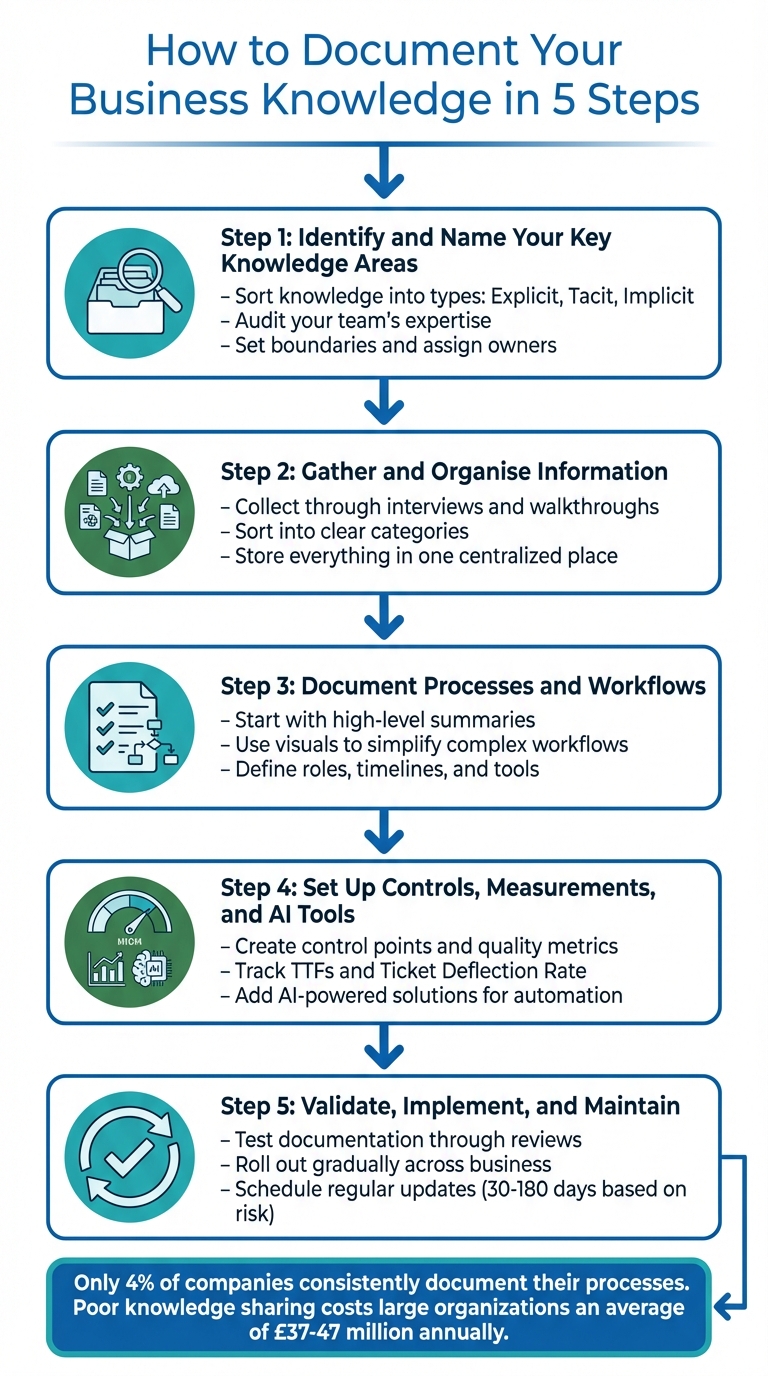
5-Step Process to Document Business Knowledge Effectively
How to Document Business Systems
sbb-itb-9e8c2f9
Step 1: Identify and Name Your Key Knowledge Areas
Before diving into documentation, it’s crucial to map out all the knowledge your business already holds. This involves pinpointing your team’s expertise and categorising it effectively. Without this groundwork, you could end up with a chaotic set of documents that no one can easily use or find.
Sort Knowledge into Types
Explicit knowledge is the easiest to document. It includes things like instructional manuals, reports, business rules, and intellectual property. Since this information is already structured, it can be written down without much difficulty.
Tacit knowledge, on the other hand, is more elusive. It’s tied to personal experiences and the way your team operates. This might include insights like how competitors are positioned, the history of client relationships, or the intuitive skills your team has developed over time. Often, this type of knowledge remains undocumented simply because people don’t realise how valuable it is.
Implicit knowledge sits between the two. It represents the lessons learned through applying explicit processes repeatedly – like finding a more efficient way to complete a task that hasn’t yet been formally recorded. A good starting point is to focus on documenting explicit knowledge first, then work your way towards capturing the subtleties of tacit and implicit knowledge.
Audit Your Team’s Expertise
To get a full picture of your team’s knowledge, conduct an audit of individual, group, and structural expertise. Ask team members to list their responsibilities based on how often they perform them (daily, weekly, monthly, or annually). Shadow their workflows to uncover those tacit details that are harder to articulate.
Using a mix of interviews, questionnaires, surveys, and direct observation can provide a well-rounded view of how information flows within your team. Keep an eye out for gaps, like outdated processes or missing details, that may need attention.
Set Boundaries and Assign Owners
Once you’ve identified your knowledge areas, set clear boundaries for each one. Assign a single owner to be responsible for maintaining and updating each area. This avoids confusion and ensures accountability, so nothing slips through the cracks.
When developing new processes, start with input from a small group of subject matter experts. Too many opinions can slow things down. Organise your documentation by how useful it is, not when it was created. The most frequently used processes should be the easiest to find.
"If a process is being used every day, that needs to be the first and most visible doc in your wiki or knowledge base" – Stacy La, Director of Design at Clover Health
With your knowledge areas clearly defined and responsibility assigned, you’re ready to start gathering and organising the information.
Step 2: Gather and Organise Information
Once you’ve outlined the key knowledge areas, the next step is to dive into the details and arrange them in a way that makes sense. A solid organisational plan will help you avoid the chaos of random data collection.
Collect Knowledge Through Interviews and Walkthroughs
The best way to gather business knowledge is by speaking directly to the people who are hands-on with the work. Shadowing employees is an excellent way to uncover tacit knowledge – those practical insights that often don’t make it into formal documents. Combine this with step-by-step walkthroughs where you record the key actions and decisions as though you’re creating instructions for someone new.
Interviews are also a great tool for filling in the gaps. Ask questions like, “What do you wish you knew when you first started?” You can back this up with surveys, questionnaires, or direct observation. To make the process efficient, focus on the 20% of workflows that drive 80% of your results – things like onboarding clients, managing invoices, or delivering services.
Sort Information into Clear Categories
Once you’ve gathered your information, organise it in a way that reflects how often it’s used, not just by date or alphabetically. For example, daily tasks like CRM updates should be easy to access, while annual processes can sit lower in your hierarchy. Break down complicated workflows into smaller, manageable steps, and assign each step to a specific owner.
You can also group information into practical categories. For instance:
- Decision frameworks: Pricing guidelines, qualification criteria.
- Delivery processes: Client journey maps, quality standards.
- Commercial assets: Sales playbooks, case studies.
By structuring the information in a way that matches your team’s workflow, you’ll make it easier for everyone to find exactly what they need, when they need it.
Store Everything in One Place
After organising the information, centralise it to keep it accessible and up to date. A centralised hub ensures your knowledge isn’t scattered across emails, shared drives, or personal devices. Tools like Notion offer a flexible, block-based system for creating wikis, databases, and team spaces that can house text, videos, and embedded tools. Alternatively, Confluence uses Spaces and Pages to organise knowledge, making it searchable and easy to navigate – an upgrade from the traditional file-and-folder approach.
Both platforms integrate seamlessly with tools like Slack, Jira, and Google Drive, ensuring your information stays current. Use templates and hierarchical structures (such as nested sub-pages in Notion or Page Trees in Confluence) to create a logical flow. Lastly, set up permissions to safeguard sensitive information while maintaining transparency for the rest of your team.
Step 3: Document Processes and Workflows
Once you’ve organised your collected knowledge, the next step is to turn it into clear, actionable workflows. This means structuring the information into step-by-step processes that show exactly how tasks are completed.
Start with High-Level Summaries
Begin by creating a high-level overview for each process. Identify the trigger that starts the process and the outcome that marks its completion. This helps keep the process focused and prevents it from expanding beyond its original purpose. For instance, a client onboarding workflow might start when a signed contract is received and end when the client gets their first deliverable.
Here’s a surprising statistic: only 4% of companies consistently document their business processes. Poor documentation costs large organisations an average of £37 million annually. To avoid this, break down complex tasks into smaller, manageable steps. If you find yourself linking actions with "and" or "then" repeatedly, it might be time to split the step into separate, more focused actions. This approach ensures that anyone on the team can follow the process, even in your absence, maintaining consistency and continuity.
To reinforce clarity, pair your summaries with visuals.
Use Visuals to Simplify Complex Workflows
Visual aids can make even the most complicated workflows easier to grasp. Studies show that retention increases to 30% when information is presented visually. Use standardised symbols to make diagrams intuitive: ovals for start and end points, rectangles for tasks, diamonds for decisions, and arrows to indicate flow.
For processes involving multiple departments, swimlane diagrams can be incredibly helpful. These diagrams divide workflows into lanes, each representing a specific team or role, making it easier to see how responsibilities are handed off. A great example comes from Swiss insurer La Mobilière, which digitised its workflows using Miro. This change saved three days of setup time for planning sessions during a four-month pilot and reduced errors by improving team alignment.
"A visual workflow, with its explicit boxes, arrows, and decision diamonds, forces a certain level of unambiguous precision. It’s much harder to creatively interpret a directional arrow than a loosely worded sentence." – Michael Kern, Content Marketer, Zapier
Define Roles, Timelines, and Tools
Each step in the process should clearly state who is responsible for it. Use job titles, like "Marketing Manager", instead of individual names to ensure the documentation remains relevant even as team members change.
Specify timelines for each step, including any deadlines for deliverables. List all necessary tools and resources, such as CRM software, templates, or physical equipment. For workflows that involve multiple teams, a RACI framework (Responsible, Accountable, Consulted, Informed) can help clarify everyone’s role. Start by documenting the standard or "happy path", but don’t forget to include exceptions – those scenarios where the process might deviate and require alternative steps.
With your processes now clearly documented, you’re ready to move on to establishing controls and exploring AI-powered solutions.
Step 4: Set Up Controls, Measurements, and AI Tools
Now that you’ve organised your processes and information, it’s time to ensure your knowledge remains accurate and useful over time. This involves establishing quality checks, tracking key metrics, and integrating AI tools to keep everything up-to-date and effective.
Create Control Points and Quality Metrics
Start by implementing a robust review process. Before launching your documentation, use a multi-stage checklist to examine layout consistency, language clarity, data accuracy, and regulatory compliance. A great way to test your documentation is the "stranger test." Hand it to someone unfamiliar with the task and observe if they can complete it without assistance. If they struggle, it’s a sign your documentation needs more work.
Two key metrics can help you evaluate the effectiveness of your documentation:
- Time-to-First-Success (TTFS): This tracks how long it takes a user to read your documentation and successfully complete a task.
- Ticket Deflection Rate: This measures how many support requests are avoided thanks to your documentation. You can track this by noting when users view your content without submitting a support ticket within 24 hours.
Poorly managed processes and documentation can cost businesses 20–30% of their annual revenue. By monitoring these metrics, you can directly address inefficiencies that impact your bottom line.
Ownership and regular audits are also critical. Assign someone to maintain each document and schedule periodic reviews to catch outdated or inaccurate information. For example, in 2001, Dr Peter Pronovost at Johns Hopkins Hospital introduced a simple checklist for ICU doctors to prevent central line infections. Over a year, this checklist prevented 43 infections, saved eight lives, and reduced costs by approximately £1.6 million.
These strategies not only ensure high-quality documentation but also create a scalable system that can operate smoothly without constant oversight. With this foundation, you’re ready to integrate AI tools for even greater efficiency.
Add AI-Powered Solutions
AI can revolutionise the way you create and maintain documentation. Tools like Beyond the Founder‘s intelligent SOP generators and custom GPTs can turn expertise into well-organised, accessible documents.
For companies building their own systems, automated tools can cut creation time by up to 95% and be configured to update as often as needed – whether it’s hourly API checks or weekly regulatory reviews. Take TerraHR as an example: In early 2024, this 14-person HR consulting firm implemented a self-updating knowledge base that automatically pulled wage data from government sources. Co-founder Lena Ruiz led the project, which reduced consultant onboarding time from 13.2 hours to 3.9 hours and eliminated compliance errors in Q1 2024.
"It’s not that the AI knows more. It’s that our people always know where the latest truth lives." – Lena Ruiz, Co-founder, TerraHR
To build trust and ensure accuracy, require AI tools to cite their sources with direct links. Also, align the update frequency of your AI systems with how often the underlying information changes.
Step 5: Validate, Implement, and Maintain
Now that you’ve documented your processes and used AI to assist with quality checks, it’s time to ensure your knowledge base is practical, accurate, and ready for use. This step focuses on testing, implementing, and maintaining your documentation so it becomes a dependable resource. Let’s dive into how to fine-tune and roll it out effectively.
Test Documentation Through Reviews
Before launching, it’s crucial to test your documentation. One highly effective method is the blind walkthrough. This involves asking someone unfamiliar with the task to complete it using only the documentation provided. Their struggles will highlight areas that need improvement.
Another useful approach is dual-screen verification, where you display the documentation alongside the system and verify each step. This helps catch errors such as outdated screenshots or missing instructions.
"When you have documentation that looks official but is actually wrong? People follow it confidently – and end up making mistakes, wasting time, or breaking things." – Yuval Karmi, Founder and CEO, Glitter AI
Feedback is essential. Collect input from process owners, regular users, new employees, and managers. Use a checklist to evaluate the documentation against three key criteria:
- Accuracy: Are screenshots and instructions up to date?
- Completeness: Does it cover prerequisites and edge cases?
- Usability: Is the language simple and the layout easy to follow?
After addressing the feedback, test again to ensure the updates resolved any issues.
Roll Out Documentation Across Your Business
A gradual rollout is often the best strategy. Start with a phased rollout, selecting a pilot group of users to test the documentation and provide feedback. This allows you to refine the process before deploying it company-wide.
Securing executive sponsorship early on is key. Leadership backing signals that the documentation initiative is a priority and can help overcome resistance to change. Centralise all documentation in a single, searchable location – your "source of truth" – to avoid version control issues and information silos. Ensure consistency by using standardised templates and style guidelines so all documentation feels cohesive and easy to navigate.
To make adoption easier, create quick-start guides or one-page tips that help users get up to speed with new tools. Include feedback channels like "Was this helpful?" surveys or dedicated chat groups to ensure the documentation evolves to meet users’ needs. Effective feedback mechanisms are crucial for maintaining relevance. For instance, call centres with well-organised knowledge bases have achieved search success rates of around 85% and saved agents about two minutes per call.
Finally, implement a plan to ensure your documentation stays accurate and up to date.
Schedule Regular Updates
Switch to a change-driven review system, where updates are prompted by actual business changes rather than relying solely on scheduled reviews.
Categorise content by risk level to determine how often it needs reviewing. High-risk topics like policies, billing, or security should be checked every 30–60 days. Medium-risk workflows can be reviewed every 90 days, while low-risk, evergreen content can be updated every 180 days. Include a standardised header in each document showing details like the owner, last review date, next review date, and sources.
| Review Type | Content Examples | Frequency |
|---|---|---|
| High Risk | Policy/Legal/Security/Billing | Every 30–60 days |
| Medium Risk | Core Operations | Every 90 days |
| Low Risk | General Guidance | Every 180 days |
Keep an eye on key sources, such as release notes, pricing updates, or policy changes, as these can impact your documentation. Use tools to detect changes automatically and trigger review tasks when updates are needed. Add features like "Is this helpful?" or "Report inaccuracy" buttons so users can flag outdated information quickly.
"It only takes a couple of times of running into inaccurate documentation for a new employee to lose trust in the process." – Slack
Only 4% of companies consistently document their processes, yet poor knowledge sharing costs large organisations an average of £47 million annually. To avoid this, schedule regular "clean-up" sprints – monthly or quarterly – to organise files and refresh outdated content. This proactive approach ensures your knowledge base remains a valuable resource rather than becoming a neglected liability.
Conclusion
This guide presents a straightforward 5-step plan to capture and preserve your business knowledge. The steps – pinpointing key knowledge areas, organising and gathering information, documenting workflows, implementing controls and AI tools, and regularly validating your documentation – provide a structured approach to turn scattered expertise into a centralised, dependable resource.
The risks of ignoring these steps are clear. As mentioned earlier, poor knowledge sharing can be costly. For instance, in 2018, Veronique James of The James Agency faced significant challenges after major staff turnover left a "void of knowledge." By gathering insights from her remaining team and creating a "Day One Curriculum", she automated new hire training. This approach allowed her to scale the agency to a 30-person team without needing to personally handle every onboarding process.
Start with Step 1 by focusing on the processes that disrupt your operations the most. Prioritise the 20% of tasks that drive 80% of your results – like client onboarding, invoicing, or your core delivery methods. Tackling a small, impactful area first helps build momentum without overwhelming your team.
Tools like Beyond the Founder’s AI-driven solutions can further simplify this process. These tools capture expertise, automate document updates, and create custom AI assistants, addressing the "tribal knowledge trap" before it becomes a problem. By converting individual expertise into shared knowledge, your business becomes more resilient and ready to scale.
FAQs
Where should I start if I can only document a few things?
To get started, identify the core processes that are essential for keeping your business running efficiently. Start with tasks like onboarding new employees or other critical workflows. These are the areas where proper documentation can ensure smooth operations and minimise dependency on any single person. By prioritising these key tasks, you’ll see an immediate benefit while also setting the stage for expanding your documentation efforts in the future.
How do I capture tacit knowledge that people struggle to explain?
To gather tacit knowledge, try techniques like shadowing, practising tasks directly, or recording casual conversations and demonstrations. These methods can reveal the kind of experiential and intuitive know-how that’s often hard to put into words. By focusing on observing real-life actions and fostering open dialogue, you can make this type of knowledge easier to share and pass on.
How can I keep documentation accurate without constant manual updates?
Keeping documentation accurate without constant manual intervention can be streamlined with a few smart strategies. Start by assigning clear ownership for each document – this ensures someone is always accountable for its upkeep. Pair this with simple, recurring review schedules to catch outdated information regularly.
In addition, use tools that offer features like page verification and scheduled review periods. These help flag content for updates at the right time. Monitoring key sources for changes and automating alerts can also trigger review tasks automatically, cutting down on manual effort. Establishing a steady review process not only saves time but also ensures your information remains dependable.
Related Blog Posts
Create the Flexibilty You've Always Craved
Reclaim control and build real independence.
We respect your inbox. No spam, just meaningful updates.