How to Scale a Business Without Working More Hours
15 February 2026

Scaling your business doesn’t mean working longer hours. Instead, it’s about creating systems that handle tasks efficiently, freeing up your time for bigger priorities. By using AI and structured processes, you can reduce workload, improve consistency, and focus on growth. Here’s how:
- Document decision-making: Break down your thought process so your team can act independently. This reduces reliance on you for routine decisions.
- Automate workflows: Identify repetitive tasks and automate them using AI tools, saving hours each week.
- Create reusable sales and marketing assets: Develop playbooks, case studies, and messaging frameworks to streamline customer acquisition.
- Centralise knowledge: Build an accessible repository for your team to find answers quickly, cutting down interruptions.
- Leverage AI for full automation: Use custom AI tools to handle predictable tasks, allowing your team to focus on higher-value work.
The goal is to shift from being involved in every detail to leading with clarity. Start small, measure the impact, and scale your systems step by step.
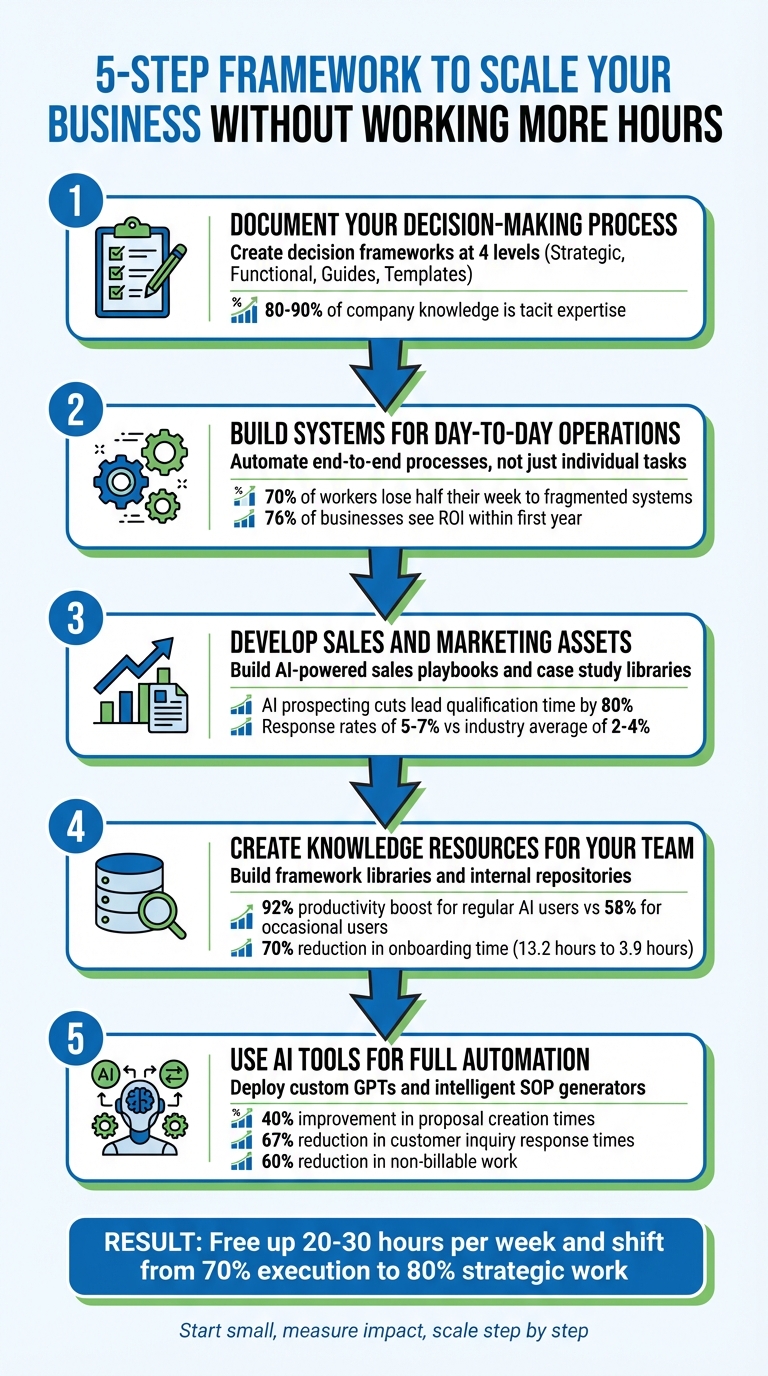
5-Step Framework to Scale Your Business Without Working More Hours
Stop the Hustle: Build Business Systems That Scale Without Burnout
sbb-itb-9e8c2f9
Step 1: Document Your Decision-Making Process
Many founders unintentionally become roadblocks in their own organisations. Teams often need insight into the reasoning behind decisions to act independently. By documenting your decision-making process, you allow your team to operate more autonomously, reducing their dependence on your direct input.
This step lays the groundwork for building structured systems that can function smoothly without constant founder involvement.
Create Decision Frameworks
Start by documenting your ‘Business DNA’ – this includes your strategy, tone, and operational rules. Store this in a centralised location so your team can access it whenever needed for independent decision-making.
Break your documentation into four levels for clarity and accessibility:
| Documentation Level | Target Audience | Content Focus |
|---|---|---|
| Level 1: Strategic | Leadership | Explains why the process exists and its alignment with business goals |
| Level 2: Functional | Managers | Details how the process interacts with other departments |
| Level 3: Guides | Execution Team | Step-by-step instructions to complete tasks |
| Level 4: Templates | Daily Users | Provides scripts, checklists, and ready-to-use tools |
This structured approach converts implicit knowledge into assets that can scale. For instance, you can integrate this information into custom AI tools trained on your brand guidelines, customer profiles, and historical decision data. A practical example is Seam AI‘s 10-person team, which created a ‘Data-extraction GPT’ to help non-technical employees access datasets without relying on the founder’s input.
"AI can’t augment what isn’t documented." – Hayden Miyamoto, Founder of EMPOWER Labs
To make your documentation even more tailored, use micro-prompting. Ask yourself questions like, "What additional details reflect my brand’s unique vision?" This ensures the framework captures the finer elements that set your business apart.
Ensure Consistent Decision-Making
Once your framework is in place, the next challenge is ensuring it is consistently applied across your team.
A good framework should empower team members to make decisions independently. If routine decisions still require your approval, the framework needs refining to reduce dependency on you.
"Now employees at the company can access my brain without accessing my time." – Kirk Chisholm, Innovative Advisory Group
With documented frameworks, your team can handle tasks like client inquiries, pricing decisions, and risk assessments confidently, freeing you to focus on larger strategic goals.
To prepare for the unexpected, establish exception-handling protocols. These should outline clear steps for dealing with scenarios that fall outside the usual guidelines. For example, you might specify: "If a client requests a discount above 15%, offer the standard 10% and schedule a follow-up call to discuss their needs."
With 80% of businesses already leveraging AI, embedding your expertise into documented systems ensures consistent decision-making across your organisation – even when you’re not directly involved. This approach not only streamlines operations but also positions your team to act with confidence and clarity.
Step 2: Build Systems for Day-to-Day Operations
Turn your daily operations into systems that practically run themselves. The idea here is to take repetitive tasks and transform them into standardised workflows that your team can follow consistently, without needing you to oversee every step. This approach lays the groundwork for AI-driven automation, freeing up more of your time.
The aim isn’t just to automate one-off tasks, like drafting a single email. Instead, it’s about creating end-to-end process automation that manages entire workflows from beginning to end. This shift – from focusing on individual tasks to streamlining entire processes – is what drives exponential growth, where your revenue grows much faster than your costs.
Create Methodologies and Playbooks
Start by pinpointing the key processes that define how your business delivers its value. These could include client onboarding, project delivery, or quality control. The goal is to document these workflows so they’re easy to replicate and scale.
A great way to approach this is by using the CRAFT Cycle framework. First, get a Clear picture by outlining the goal, inputs, steps, and success metrics for each process. Make sure the process works well before you even think about automation. Then move to Realistic design – focus on creating a minimum viable solution rather than trying to automate everything all at once.
"The real value comes when you automate entire processes – scaling what your team does best and unlocking ‘infinite time’ for the work only humans can do." – Rachel Woods, Founder, DiviUp
To ensure consistency, create delivery assets like methodologies, client journey maps, and quality benchmarks. For instance, you could develop a standardised onboarding process that covers every step, from first contact to project completion. This ensures every client gets the same excellent service, no matter who on your team handles their account.
Keep all playbooks in a centralised hub – tools like Notion, ClickUp, or Airtable work well. This eliminates the chaos of scattered information. Research shows that around 70% of workers lose half their week navigating fragmented systems and disconnected tools. By storing everything in one place, your team can find what they need quickly without wasting time.
Once your workflows are clearly mapped, you can shift your focus to automating these repetitive tasks.
Automate Routine Tasks
With solid methodologies in place, the next step is identifying tasks that can be automated. Use the 80/20 Rule of AI: target the 20% of routine tasks that take up 80% of your time.
Not every task is a good candidate for automation. Focus on tasks that are high-volume and predictable. Apply the "Intern" Test: if a process is too messy to hand off to a human intern, it’s not ready for AI.
| Task Category | Automation Suitability | Example Use Case |
|---|---|---|
| Lead Follow-Up | High (Rules-based) | Chatbots qualifying leads and logging them in CRM |
| Reporting | High (Data-driven) | Automated dashboards pulling real-time KPI data |
| Data Entry | High (Repetitive) | Extracting invoice data into accounting software |
| Decision-Making | Low (Judgement-based) | Strategic planning or solving complex problems |
| Relationship Building | Low (Human-centric) | High-value client interactions and partnerships |
Begin with small, impactful wins to build your team’s confidence. Examples include automating meeting summaries, sorting lead intake, or updating KPI dashboards. For instance, companies that respond to leads within five minutes are 21 times more likely to convert, making automated lead response systems a smart starting point.
Manual data transfers between disconnected systems can take up 15–20 hours per week for small teams. Automating these workflows can free up as much as 20% of your team’s time, allowing them to focus on tasks that add more value. In fact, 76% of businesses that adopt automation see a return on investment within the first year.
"Delegation without automation is just putting your chaos into someone else’s hands." – Carl Taylor, Founder, Automation Agency
Step 3: Develop Sales and Marketing Assets
Once your decision-making processes and operations are running smoothly, it’s time to focus on sales and marketing tools that can help boost revenue. The idea is to create resources that do the heavy lifting for you – eliminating the need to handle every prospect conversation or draft every message manually. When designed well, these assets transform your best sales tactics into repeatable systems that your team – or even AI – can execute consistently.
Build Sales Playbooks and Messaging Frameworks
Static PDFs gathering dust are a thing of the past. Modern sales playbooks, especially those powered by AI, are dynamic tools that manage lead enrichment, personalise outreach, and even update your CRM automatically.
Start by capturing what already works. Record successful sales calls using tools like Fathom or Fireflies, and analyse the transcripts with AI to uncover patterns, objections, and winning responses. Keep an "Objection Log" updated weekly to ensure your team is armed with effective rebuttals.
Your playbook needs a few essentials. First, define your Ideal Customer Profile (ICP) based on actual closed deals – not just assumptions about your customer base. Then, create messaging frameworks that leverage real-time buyer signals, such as recent funding announcements or company growth. Finally, document your sales process so thoroughly that a new hire could follow it from the first contact to closing the deal.
Start small. Test your messaging on smaller groups before rolling it out on a larger scale.
"You can’t outsource your way to $1M… Get the motion working first, then document, train, and scale." – Predictable Revenue Manifesto
Once your process is well-documented, AI can take over much of the repetitive work. For instance, AI prospecting tools can cut lead qualification time by up to 80%, allowing your team to focus on more meaningful conversations. High-performing AI sales tools have also achieved response rates of 5–7%, compared to the industry average of 2–4%.
A great example is SaaStr, which deployed over 20 AI tools in 2025. These tools handled outbound messaging and automated collateral creation, sending 15,000 messages in just 100 days with response rates consistently above 5%. By customising their sponsorship prospectus – condensing a 100-page document into tailored 20-page decks – they maintained eight-figure revenue with a lean team.
Use Case Study Libraries
Case studies are powerful sales tools, but traditional methods of creating them are time-consuming. They typically take 4–8 weeks and require 15–25 hours of work across multiple roles. AI can speed this up dramatically, reducing production time to just days – or even hours. Teams that used to produce 6–8 case studies annually can now create 30–50.
The secret lies in integrating case study creation into your daily customer interactions. Extract insights from conversations during quarterly business reviews, success calls, or sales meetings where customers naturally share their results. Use transcription tools to capture these discussions, then let AI pull out key metrics, outcomes, and quotes.
Structure your case studies in a way that’s easy to use. Include a "TL;DR" summary, a "Customer Snapshot" (with details like industry and company size), and a "Results Summary" table featuring specific metrics. This format allows AI tools to quickly retrieve relevant examples when a prospect asks for proof of results in their sector.
To make your case studies "AI-ready", use consistent labels for factors like industry, region, and customer size. Present data in tables rather than burying it in paragraphs. This enables AI to match the most relevant examples to prospects based on CRM data and buyer behaviour.
| Feature | Traditional Case Study | AI-Optimised Case Study |
|---|---|---|
| Creation Speed | 4–8 Weeks | Hours to Days |
| Format | Static PDF / Narrative | Structured Data / Modular Blocks |
| Discovery | Manual Search / Browsing | Natural Language Query |
| Data Source | Scheduled Interviews | QBRs, Success Calls, & Interviews |
| Scalability | Limited by Headcount | High (Infinite Coverage) |
The impact is clear. Crista Grasso, founder of Lean Out Method, used AI to turn her podcast transcripts into workbooks, increasing downloads by 11% in just 90 days. This approach also created new lead magnets without adding staff. Her team even deployed a custom chatbot trained on their resource library, saving 20 hours of support work per month while improving customer experience.
"The typical case study takes 4–8 weeks to create… Case study automation addresses this bottleneck by using AI and workflow tools to compress the production timeline from weeks to days – or even hours." – AdamX
Step 4: Create Knowledge Resources for Your Team
Your team can’t read your mind. Many founders assume their employees inherently understand their decision-making processes, but without proper documentation, this often leads to interruptions, bottlenecks, and stalled operations when you’re unavailable. To avoid this, you need to translate your instincts into clear, actionable models that your team can use.
Build Framework Libraries and Mental Models
Start by focusing on what you excel at. If sales proposals are your forte, begin there instead of trying to formalise processes where you’re just average. The aim is to identify the patterns that underpin your best work – the decision points, key quality markers, and expert techniques that consistently lead to success.
Document these patterns in a way that’s easy to follow, such as decision trees. For instance, if a client raises budget concerns, your framework could suggest pivoting to a discussion on ROI, supported by a relevant case study. By doing this, you’re turning gut feelings into repeatable processes your team can rely on. Studies suggest that 80–90% of a company’s knowledge exists as tacit expertise – unspoken intuition and experience. AI can help uncover this hidden knowledge by analysing recordings of successful client interactions, strategy meetings, or brainstorming sessions.
A striking example of this potential comes from 2025, when agentic engineer Reuven Cohen used an ‘Expertise Engine’ to generate 7 million lines of code, showcasing how documented expertise can scale exponentially.
"The secret lies in transforming tacit expertise into structured systems that can be amplified and scaled." – Shep Bryan, AI Pioneer
AI can also act as a collaborator in this process. Regular users of AI tools report a 92% productivity boost compared to just 58% for occasional users. Use AI to draft initial frameworks, which you can then refine to preserve the nuance and detail your team needs.
Set Up Internal Knowledge Repositories
Once you’ve documented your team’s decision-making patterns, the next step is to centralise this information for easy access. Instead of forcing employees to sift through endless Google Drive folders, Slack threads, or email chains, create a centralised knowledge repository. This ensures your team can ask straightforward questions and get accurate answers instantly.
The impact is measurable. Knowledge workers typically spend 16% of their week searching for information, and improving knowledge-sharing practices can increase team productivity by 20–25%. Yet nearly half (47%) of employees avoid using company knowledge bases because they find them disorganised and hard to navigate.
Modern AI-powered repositories solve this problem with semantic search. Unlike traditional keyword-based systems, these tools understand the intent behind a query and deliver direct, relevant answers based on your source material. For example, in early 2024, TerraHR – a small HR consultancy with 14 employees – used Flowise to create a self-updating AI knowledge base. By integrating guidance from CalHR and internal Notion wikis, they cut average onboarding time from 13.2 hours to 3.9 hours – a 70% reduction.
Automation plays a crucial role here. AI tools can monitor your data sources – whether it’s Slack, Microsoft Teams, Notion, or vendor documentation – and automatically update the repository when changes occur. This prevents knowledge from becoming outdated, which can cost small businesses around £11,100 annually due to inefficiencies and errors.
"Self-updating systems don’t eliminate human judgement – they restore its value by removing the friction of finding reliable facts." – Dr Arjun Mehta, Organisational Technologist
To get started, run a pilot programme by focusing on a single high-traffic "knowledge hotspot", like a popular Slack channel. This will help demonstrate the benefits before scaling up across the organisation. Set update schedules based on how often the information changes – hourly for technical API documentation, daily for internal wikis, and weekly for regulatory updates. Most importantly, assign clear ownership to ensure AI-generated content is regularly reviewed and kept accurate. Think of your knowledge base as a garden that needs constant care, not a warehouse where information is just stored and forgotten.
Step 5: Use AI Tools for Full Automation
After documenting processes and creating knowledge repositories, the next logical step is to implement AI tools capable of handling complex operations independently. The goal isn’t to automate every single task but to focus on the 80% of predictable, time-consuming activities. This approach keeps systems streamlined and avoids unnecessary complexity.
Deploy Custom GPTs and Decision Assistants
Once you’ve established clear systems, integrating AI tools tailored to your business needs becomes essential.
Custom GPTs act as a scalable memory bank, storing your unique methodologies, terminology, and decision-making frameworks. This ensures your brand standards stay consistent, even when team members change. Unlike generic AI prompts, these tools are trained on your internal knowledge base, including brand guidelines, core values, and records of past successes, leading to more precise outputs.
For example, in 2025, an £8.5 million consulting firm and a £6 million manufacturing business reported impressive results after implementing custom GPTs. Their proposal creation times improved by 40%, customer inquiry response times dropped by 67%, and proposal win rates increased by 23%. These changes delivered a 3× to 5× return on investment within just six months.
"The GPT doesn’t make our decisions, but it ensures every team member can access our best thinking when they need it." – Allison Dunn, CEO, Deliberate Directions
To ensure reliability, workflows can be set with confidence thresholds. For example, tasks can proceed automatically at a high confidence level (e.g., 95%), while those with lower confidence (around 70%) are flagged for human review. Initial setup costs for custom GPTs typically range between £2,000 and £10,000, making them an accessible option for many businesses.
Use Intelligent SOP Generators
Once decision assistance is in place, the next step is to standardise your procedures.
Standard operating procedures (SOPs) are crucial for maintaining consistency, but creating them manually can be a laborious process. Intelligent SOP generators simplify this by drafting procedures based on your documented workflows. However, the output quality heavily depends on the thoroughness of your input.
Start by documenting your manual processes and use AI to refine them. AI can act as a consultant, suggesting improvements before automation is implemented. Micro-prompting is particularly useful here – rather than having AI generate an entire procedure in one go, let it ask clarifying questions about your business needs to produce more tailored results.
For instance, Elite Solutions Partner Fuelius developed a custom AI onboarding agent for managing InfoSec questionnaires. This tool saved 200 hours per client and generated an additional £160,000 in revenue by reclaiming time. Similarly, Lean Labs created a "relay team" of AI agents to automate content production. One agent grades questionnaire completeness, another drafts outlines, a third reviews them, and a fourth writes the content. This system reduced turnaround times from weeks to days.
The benefits of AI integration are clear. Businesses have reported a 60% reduction in non-billable work, and 84% of leaders say AI has improved their forecasting accuracy. To test the resilience of your automation, try a "Day-Without-Experts" drill: disable admin accounts and see if a new hire can restart the system using only the provided documentation. This exercise can help identify whether your automation reduces founder dependency or creates unnecessary complexity.
How to Measure Your Progress
Once you’ve integrated AI-powered systems, tracking their effectiveness is essential. Without clear metrics, automation can feel like navigating in the dark – you risk adding complexity rather than simplifying processes.
Here’s a framework of metrics to help you assess whether automation is delivering its intended benefits.
Identify Key Metrics to Track
A key metric to monitor is time reallocation – shifting your focus from routine tasks to strategic initiatives. Aim to move from spending 70% of your time on repetitive tasks to a ratio where 80% of your efforts are focused on strategic work.
"Measuring AI strategy success means tying AI to business outcomes you can quantify now: time saved, capacity expanded, unlocking new capabilities, and high-value time reallocated." – Ameya Deshmukh, Author, EverWorker
Another useful measure is capacity expansion, which can be tracked by observing reductions in task review times. For instance, cutting review time from 25 minutes to 5 minutes reflects a fivefold increase in capacity. Similarly, monitoring revenue per employee over three years can reveal whether your scaling efforts are effective. A 33% or greater increase in this metric indicates super-linear scaling.
Don’t forget to evaluate leading indicators like "operational friction". Gather feedback from your team on how relevant, engaging, and manageable their tasks feel. Only 4% of companies consistently derive value from AI investments, often because they fail to act on these early signals before they affect ROI. You can also calculate cost savings using this formula:
(Hours Saved per Task × Task Volume × Fully Loaded Hourly Rate) – Automation Costs.
Once these metrics are identified, compare them against baseline data to measure the impact.
Compare Before and After Results
Start by establishing a two-week baseline for metrics like cycle times, task volumes, and error rates. Run new workflows alongside manual processes to identify differences in time and quality before fully rolling them out.
| Metric Category | Before Automation | After AI Implementation | Improvement |
|---|---|---|---|
| Revenue per Employee | £150,000 | £200,000 | 33% increase |
| Worker Productivity | 1.0× baseline | 1.66× baseline | 66% increase |
| Task Cycle Time | 25 mins/unit | 5 mins/unit (review only) | 5× capacity increase |
| Team Time Allocation | 70% execution / 30% strategy | 20% execution / 80% strategy | 166% more strategic capacity |
| Communication Speed | 1.0× baseline | 1.72× baseline | 72% more output per hour |
Run a 30-day pilot focusing on one key metric, and expand implementation once you achieve at least a 20% improvement. For example, between 2023 and 2025, Clay automated 80% of its onboarding processes, achieving fivefold growth in just 18 months – proof that disciplined measurement can fuel sustainable expansion.
Regularly tracking these metrics ensures your automated systems stay aligned with your long-term strategic objectives.
Conclusion
Growing your business without adding more hours to your workweek isn’t about grinding harder; it’s about creating smart, efficient systems. On average, CEOs work an exhausting 62.5 hours per week, often stuck reacting to problems rather than driving growth. By focusing on strategies like documenting decision-making, building operational systems, developing sales and marketing assets, setting up knowledge repositories, and leveraging AI automation, you could free up 20–30 hours each week.
These efforts shift your role from being hands-on in daily operations to leading with a strategic mindset. Start by conducting a one-week audit to identify the 20% of tasks that consume 80% of your time. Use frameworks like DTA to avoid scaling inefficiencies. Once you understand where your time goes, test quick improvements with one-hour AI sprints and pre-built automation templates.
"The goal isn’t to eliminate work but to elevate your role from operator to visionary." – Phillip Hughes, Automation Consultant
It’s worth noting that by 2026, 80% of businesses have already embraced AI. Building a full automation stack typically costs between £160 and £400 per month, a small price compared to the £125,000 in annual value lost to manual processes. The key is deciding which processes to automate first.
Start small, measure the impact carefully, and expand step by step. Your business can grow without needing your constant attention – but only if you design systems that can run on their own.
FAQs
What should I automate first?
Start with tasks that are repetitive, rules-based, and likely to deliver the biggest impact with the least disruption. These are often found in areas like reporting, scheduling, data entry, and customer support workflows.
To figure out where to begin, take a close look at your weekly activities and assess them based on their revenue impact, risk, and strategic importance. This approach helps you pinpoint low-value tasks that can be eliminated, delegated, or automated. The result? Faster outcomes, measurable returns, and fewer operational headaches.
How do I stop my team relying on me?
To help your team become more self-sufficient, start by clearly outlining roles, responsibilities, and expected outcomes. This clarity gives everyone a sense of direction and accountability. Trust plays a big role too – delegate tasks effectively and give your team the space to take ownership. Setting boundaries is equally important, ensuring you’re not involved in every minor decision.
You can also introduce scalable systems to keep things running smoothly. For repetitive tasks, consider using AI tools to simplify workflows and save time. The ultimate aim is to build a structure where your team feels confident and capable, freeing you up to concentrate on bigger-picture strategies rather than getting bogged down in daily operations.
How do I measure if AI is working?
To determine how effective AI is, focus on time-based metrics that highlight productivity improvements. For instance, track the number of hours saved on tasks or the boost in output. A practical example? If AI enables a team to manage more customer queries in less time, that’s a strong sign it’s working well.
Additionally, consider adoption rates and how seamlessly AI integrates into existing workflows. High adoption and smooth integration often indicate that the tool is both user-friendly and impactful. Ultimately, success is about combining time savings, widespread usage, and alignment with business objectives to achieve meaningful efficiency.
Related Blog Posts
Create the Flexibilty You've Always Craved
Reclaim control and build real independence.
We respect your inbox. No spam, just meaningful updates.