How to Create Standard Operating Procedures Fast
20 February 2026
Creating Standard Operating Procedures (SOPs) can feel like a daunting task, but it’s essential for scaling any business. SOPs provide clear, step-by-step instructions for key tasks, ensuring consistency and efficiency. Without them, processes become chaotic, onboarding takes longer, and errors increase. The good news? AI tools can now cut the time needed to create SOPs by up to 15 times, transforming hours of work into minutes.
Here’s what you need to know:
- What are SOPs? Detailed instructions that guide your team through tasks to ensure consistency and quality.
- Why are they important? They save time, reduce errors, and make your business less dependent on any one person.
- How to create them? Start manually by observing workflows, documenting steps, and testing with new users. Then, use AI tools to speed up the process.
- AI tools like Scribe and Glitter AI automate documentation, saving hours while capturing every detail.
Whether you’re documenting processes manually or using AI, the goal is the same: to create clear, actionable instructions that anyone can follow. Start with one process, refine it, and watch as your business becomes more efficient.
How to Build SOPs Faster Using AI : Business Process Automation
sbb-itb-9e8c2f9
What Makes an Effective SOP
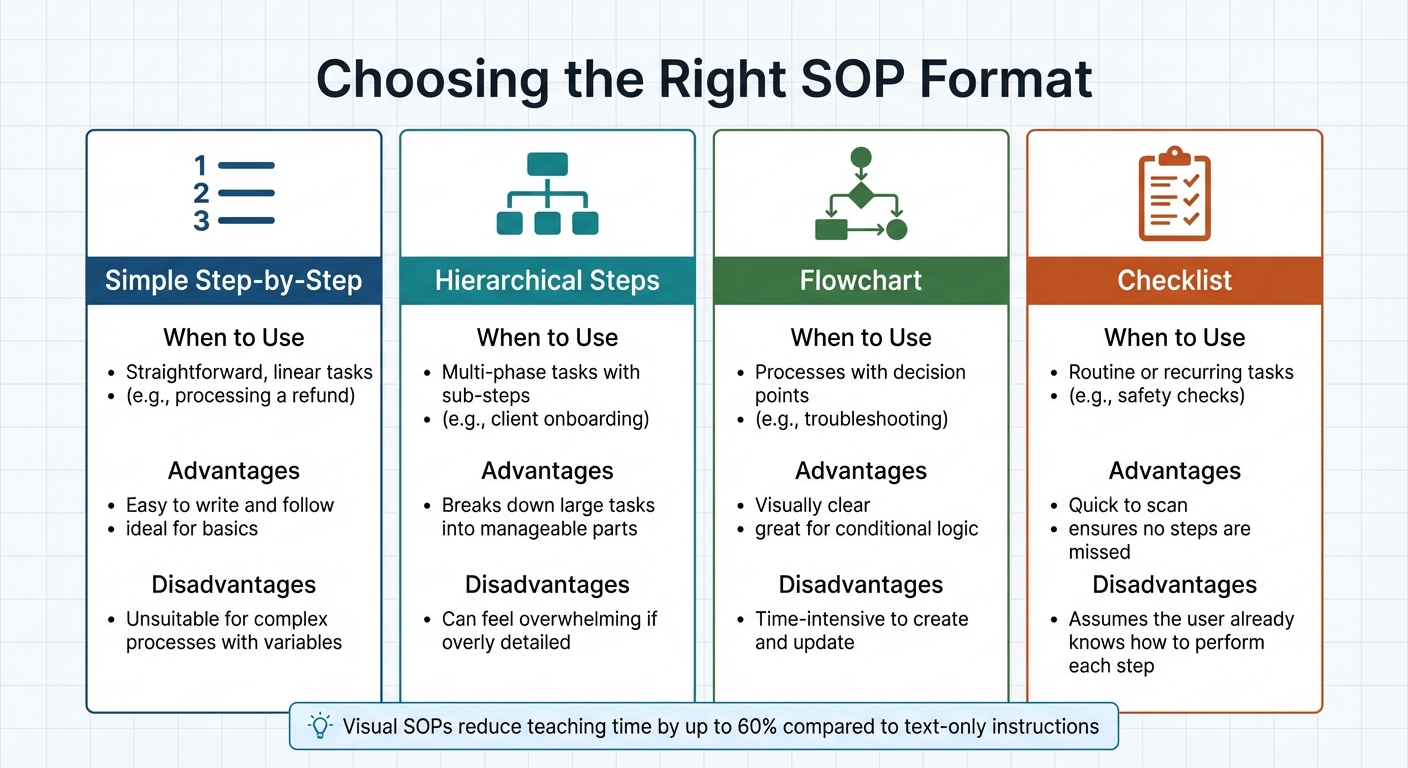
SOP Format Types Comparison Guide
Not all SOPs are created equal. A poorly written SOP creates confusion and frustration. The difference between one that collects dust in a folder and one that genuinely improves operations lies in its structure and clarity.
The ultimate test of a good SOP? A complete novice should be able to follow it successfully on their first try. If they’re left with questions or need to make assumptions, it’s time to refine the document. Let’s explore the key elements that make an SOP effective in practice.
Required Elements in Every SOP
A strong SOP begins with a document control table at the very top. This table keeps track of critical details like the version number, document owner, and the next review date (using the DD/MM/YYYY format). This ensures teams always work with the most up-to-date version. In fact, a General Accounting Office study found that inconsistent SOPs contributed to 40% of drug shortages.
Next, include a clear title and purpose statement. These outline what the procedure is about and the specific problem it addresses. To avoid confusion, define the scope – what’s included and what isn’t. A roles and responsibilities section is also essential to clarify who does what. Tools like a RACI matrix (Responsible, Accountable, Consulted, Informed) are particularly helpful here.
When writing the main instructions, stick to active and direct language. For example, say "Submit the form" instead of "The form must be submitted". Finally, include links to any related documents, tools, or other SOPs needed to complete the task. This keeps everything accessible and avoids unnecessary back-and-forth.
SOP Formats and When to Use Each One
Even a well-written SOP can fail if it’s presented in the wrong format. A wall of text won’t work for a complex process with multiple decision points, just as a flowchart is unnecessary for a simple, linear task.
The human brain processes visual information about 60,000 times faster than text. SOPs that include visual aids can reduce teaching time by up to 60% compared to text-only instructions. Clear visuals, like screenshots with indicators, eliminate guesswork and speed up understanding.
| Format Type | When to Use | Advantages | Disadvantages |
|---|---|---|---|
| Simple Step-by-Step | Straightforward, linear tasks (e.g., processing a refund). | Easy to write and follow; ideal for basics. | Unsuitable for complex processes with variables. |
| Hierarchical Steps | Multi-phase tasks with sub-steps (e.g., client onboarding). | Breaks down large tasks into manageable parts. | Can feel overwhelming if overly detailed. |
| Flowchart | Processes with decision points (e.g., troubleshooting). | Visually clear; great for conditional logic. | Time-intensive to create and update. |
| Checklist | Routine or recurring tasks (e.g., safety checks). | Quick to scan; ensures no steps are missed. | Assumes the user already knows how to perform each step. |
The format you choose should match the complexity of the task. For example:
- A simple step-by-step guide is perfect for straightforward tasks like issuing refunds.
- A flowchart works best for decision-heavy processes, such as troubleshooting.
- For multi-phase tasks like client onboarding, hierarchical steps keep the information organised and digestible.
Selecting the right format ensures your SOP is easy to understand and execute, reducing errors and improving efficiency from the start.
How to Create SOPs Manually
Creating an SOP (Standard Operating Procedure) doesn’t require fancy tools – just a structured approach and a keen eye for detail. Start by setting clear boundaries: define exactly where the task begins and ends. Without these limits, your SOP could spiral into an overly complex document that tries to cover too much. Observing the process in action is crucial to capturing all the necessary details.
One of the best ways to gather insights is by shadowing your top performer. Sit with them and watch how they handle the workflow from start to finish. Ask questions like “Why do you take this step?” to uncover hidden shortcuts or specialised knowledge that might not be obvious at first glance. These nuances are often what make an SOP truly effective. As Chris Holmes, a Growth Strategist, explains:
"Whole point of a business is to build something that grows, compounds and snowballs… then you use SOPs to ‘clone’ your best employees, then said business can grow without you."
When drafting your SOP, use active, present-tense language (e.g., "Upload the file") to make the instructions straightforward. Each step should focus on a single action, with concise explanations to avoid confusion. For screen-based tasks, include screenshots; for physical tasks, add photos or diagrams to provide visual clarity.
Recording Your Processes
After observing and refining the process, document it thoroughly. Your SOP should include the following key elements: a specific title, a clear purpose statement, defined scope, prerequisites, step-by-step instructions, and a troubleshooting section. Write with a "competent new hire" in mind – someone who has basic skills for the role but no prior experience with this exact task. Avoid unnecessary jargon, and if technical terms are unavoidable, include a glossary at the end. Research shows that employees can complete tasks up to 50% faster when they follow clear, standardised procedures. This makes the effort to ensure clarity well worth it.
Testing and Improving Your SOPs
The "naive" tester method is one of the most effective ways to evaluate your SOP. Hand the draft to someone who has never performed the task before and observe them as they follow the instructions. Resist the urge to step in unless absolutely necessary – any confusion they encounter will highlight areas that need improvement.
Gather feedback from both subject matter experts (to verify accuracy) and end-users (to ensure the instructions are practical and easy to follow). Assign ownership of each SOP to a specific person and schedule regular reviews – quarterly for processes that frequently change, and annually for those that are more stable. Without a designated owner, SOPs can quickly become outdated.
When rolling out a revised SOP, consider offering a two-week grace period. During this time, any mistakes made while following the new procedure won’t be penalised. This approach encourages honest feedback and helps iron out any lingering issues before the SOP is fully implemented. By refining your SOPs in this way, you create a system that not only improves clarity but also supports a scalable, self-sufficient operation.
AI Tools That Speed Up SOP Creation
Once you’ve mastered manual SOP creation, it’s time to see how AI tools can make the process even faster and more efficient.
AI-powered tools can cut documentation time to under 10 minutes. By tracking your actions in real-time, these tools automatically generate structured, step-by-step instructions. Generative AI handles 60–70% of knowledge-based documentation tasks, saving desk-based workers an average of 4–11 hours per week.
In addition to speed, these tools offer precision, capturing every action without relying on memory.
Beyond the Founder‘s Intelligent SOP Generator
Beyond the Founder’s AI tools are designed to turn a founder’s expertise into scalable workflows. These tools don’t just record actions – they capture the reasoning behind decisions. This "why" transforms a basic set of steps into a truly effective process. By structuring a founder’s knowledge into actionable SOPs, companies can ensure smooth operations. As Yuval Karmi, Founder of Glitter AI, aptly put it:
"The people who know the processes best are usually the busiest. Asking them to spend hours on documentation? Good luck getting that prioritised."
With automation taking over the tedious parts of documentation, founders can share their expertise without spending endless hours writing it all down.
AI Features in Other Platforms
Several platforms offer unique AI-driven features to simplify SOP creation:
- Scribe: This tool uses a browser extension to automatically capture workflows. It records every click and screen transition, creating a visual guide with screenshots and annotations. Users report it being 15 times faster than manual documentation and say it boosts team productivity by 25%. As Brendan C., a Google Chrome Store reviewer, shared:
"This has changed how we write SOPs and other documentation entirely at my organisation. Biggest time saver of my career."
- Glitter AI: Combining screen capture with voice narration, this tool lets you explain your actions as you work. The AI transcribes your speech and converts it into professional, action-oriented instructions. It’s especially useful for complex desktop applications. The first 10 guides are free, and paid plans start at £10 per month per creator.
- Notion AI: Within the Notion workspace, you can describe a process in plain language, and the AI will format it into a proper SOP with sections like purpose, scope, and step-by-step instructions. It also offers context-aware editing to adjust tone, fix grammar, or expand brief points into detailed explanations.
When using recording-based tools, slow your pace to about 75% of your normal speed to ensure every detail is captured accurately. Narrate not just your actions but also the reasoning behind them – this helps the AI include the logic behind your process. And always use sample data during recording to protect sensitive information.
How to Implement SOPs in Your Business
Once you’ve developed your SOPs, the real work begins – getting your team to actively use them. Drafting procedures is just one part of the equation; the bigger challenge is ensuring they’re adopted seamlessly into daily operations. To make this happen, your SOPs need to be easy to locate and access. Ideally, all documents should be stored in a single, searchable location that anyone can access in under 30 seconds. If SOPs are hidden in endless folders or scattered across platforms, people are likely to ignore them and stick to old habits.
A practical solution is contextual linking, which integrates SOPs into your team’s workflow. For example, you can attach relevant SOPs to calendar invites for recurring tasks, link them directly in project management tools, or even use QR codes posted in workspaces for quick access. Another game-changer is appointing a "Systems Champion" – a person responsible for maintaining and updating SOPs. This not only keeps your processes current but also allows business owners or managers to step back from day-to-day operations while ensuring everything runs smoothly. The goal is to integrate these strategies into your existing systems without disrupting the flow of work.
Creating Consistent SOP Formats
Consistency in formatting is crucial for making SOPs easy to use and dependable. A standardised format ensures that every document is instantly recognisable and builds trust in its accuracy. A well-structured SOP should include:
- A header with the document title and version number.
- A document control table listing the owner, implementation date, last review, and approver.
- A revision log to track updates.
Adding your organisation’s branding – such as logos, fonts, and colours – gives the documents a polished, professional look. To maintain control, set SOPs to read-only for general users, limiting editing rights to authorised personnel. This prevents unauthorised changes and ensures that everyone always refers to the correct version. For UK-based organisations, remember to use en-GB spelling conventions (e.g., "standardise").
Keeping SOPs Current
Assigning responsibility for each SOP to a specific subject matter expert (rather than an entire department) ensures accountability. This person will be in charge of keeping the document accurate and up to date. SOPs should be reviewed annually, though high-risk processes may need updates every six months. Use tools like track changes or version control systems to log updates, creating a clear audit trail.
It’s also essential to update SOPs immediately whenever processes are revised, new tools are introduced, or feedback highlights areas for improvement. As PDF.ai puts it:
"An SOP isn’t about killing creativity. It’s about systematising the routine tasks so your team can pour their creative energy into the high-value problems that actually move the needle".
Conclusion
Creating SOPs doesn’t have to feel like an overwhelming task. Thanks to AI-powered tools, what once took hours can now be accomplished in just 5–15 minutes. This shift makes it far easier to document processes, ensuring that the knowledge in your head is effectively transferred into reliable systems your team can use. The result? Less time spent on manual documentation and more time focused on productivity and efficiency.
The impact is clear. Studies show that outdated or poorly managed SOPs can drain up to 21.3% of a business’s productivity. On the flip side, AI-powered tools have been shown to increase team productivity by 25% and help employees find the information they need 67% faster. Business leaders have found that simplifying SOP creation not only saves time but also supports strategic growth.
The trick is to document processes as they happen, explain the reasoning behind decisions, and treat AI-generated drafts as a starting point that only requires minimal editing. This method aligns with scalable, founder-free business models. Beyond the Founder’s intelligent SOP generator helps turn founder expertise into repeatable workflows, capturing the unique knowledge that drives your business and transforming it into assets that enable your company to flourish without needing your constant input.
Why not start small? Pick one process, record it, let AI organise it, and see how quickly you can shift from being a bottleneck to empowering your business to run independently.
FAQs
Which business process should I document first?
When creating your SOPs, begin with the process that is either the most critical or the one performed most often. Pay extra attention to workflows that involve safety concerns, require coordination across multiple departments, or tend to encounter frequent issues. By addressing these key areas first, you’ll not only minimise risks but also create a solid starting point for improving efficiency. Focusing on these essential processes ensures your efforts have an immediate and meaningful impact.
How do I keep SOPs updated without creating admin overload?
Keeping SOPs updated can be a challenge, but AI-driven tools can make it much easier. These tools can automatically detect workflow changes and incorporate them into your existing documents, cutting down on the need for manual edits.
On top of that, using version control systems and setting up regular review schedules helps maintain accuracy and ensures your SOPs stay relevant. By combining structured prompts with AI-assisted content generation, teams can update documents more efficiently, saving time and reducing the workload.
How do I stop AI-made SOPs from missing key context?
To create effective AI-generated SOPs, focus on clear, action-oriented sentences and maintain consistent formatting throughout the document. Make sure to include detailed explanations for decisions, as this helps clarify the reasoning behind specific actions. Regularly reviewing and updating the content ensures accuracy and keeps your SOPs relevant. This not only enhances understanding but also ensures your SOPs stay thorough and current.
Related Blog Posts
Create the Flexibilty You've Always Craved
Reclaim control and build real independence.
We respect your inbox. No spam, just meaningful updates.